In the PrestaShop 1.5 back office, you have the ability to send email via either the php mail() function or SMTP. It is the most common to use the php mail() function. When using this setting, you may receive an error like the one below:
This error occurs because of a false return code for the following statement in the MailSend.php.
The first thing you want to check is to see if the mail() function is enabled on your server. This can be easily checked by using a phpinfo page. If the mail function is disabled, it will display in the disable_functions label as shown here.
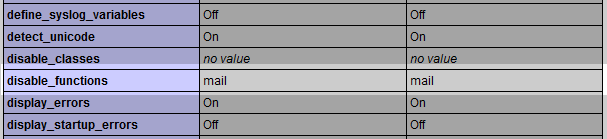
If the mail function is enabled, then you may need to follow the steps below to fix the issue and allow your site to send mail. Follow the guide below as we show you how to fix the “Sending failed using mail() as PHP’s default mail() function returned boolean FALSE” error in PrestaShop 1.5.
Fixing the ability to use the mail function in PrestaShop 1.5
- First, log into your cPanel dashboard.
- From the main cPanel, navigate to the root folder for your PrestaShop application by using the File Manager.
- Once in the root folder, you will need to make three code changes in three files. The first is located in the /tools/swift/Swift/Plugin/MailSend.php at around line 158.
Change
$headers = $headers->build();To
$headers = $headers->build();
$params = “”; - Next, navigate to the /tools/swift/Swift/Message.php file to around line 79.
Change
$this->setFrom(“”);To
$this->setFrom(“[email protected]”); - Finally, navigate and change the /tools/swift/Swift.php file at around line 370.
Change
if (!($has_reply_to = $message->getReplyTo())) $message->setReplyTo($from);To
if (!($has_reply_to = $message->getReplyTo())) $message->setReplyTo($from);
if (!$has_reply_to[0]) $message->setReplyTo($from->getAddress()); - Ensure you save each of the edited files in order to activate the changes. Your PrestaShop 1.5 site should now be able to send email. Special thanks from Sales Mechanics in the PrestaShop.com forums for this fix!