In this tutorial we will show you how to fix the “manifest cache” error in Joomla!
You may be receiving errors after upgrading to Joomla 2.5.9 that look similar to this:
Refresh Manifest Cache failed: Extension is not currently installed.
or this:
Error on updating manifest cache: (type, element, folder, client)
Fixing the Manifest Cache failed error
- Login to the Joomla Admin section.
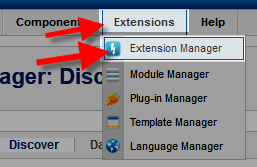
- Roll your mouse over the Extensions option, and click Extension Manager.
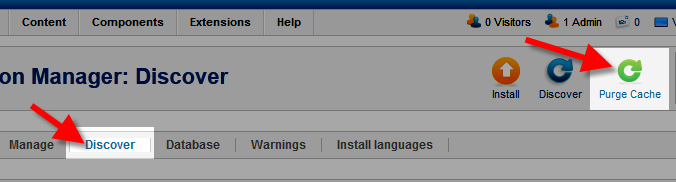
- Click the Discover tab, then the Purge Cache button.
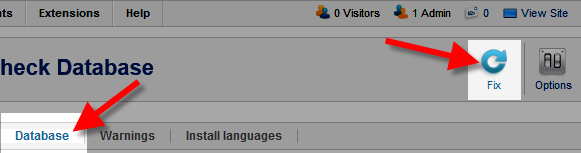
- Now, click the Database tab, then the Fix button.
You will see a notification stating “Purged discovered extensions,” and your error should go away.
Congratulations, now you know how to fix the manifest cache error after upgrading to Joomla 2.5.9! You should no longer get the following errors in Joomla:
Refresh Manifest Cache failed: Extension is not currently installed.
or this:
Error on updating manifest cache: (type, element, folder, client)