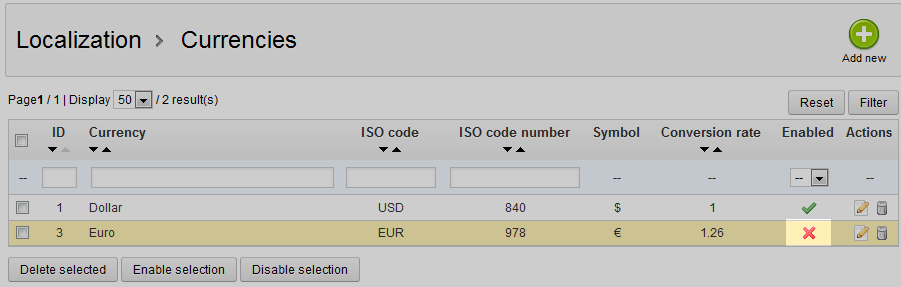
After learning how to add and edit a currency from the list with our previous articles, you will now want to learn to disable a currency. This is useful when you have the currency data and do not want to allow it to be used at the present time. This way, you can remove a currency from the active list but retain all the data in case you want to re-activate it in the future. The instructions below will guide you on disabling a currency in your PrestaShop 1.5 store.
Preventing a currency from displaying in PrestaShop 1.5
- Log into your PrestaShop 1.5 admin dashboard.
- Using the top menu bar, hover over the Localizations tab and click on the Currencies option.
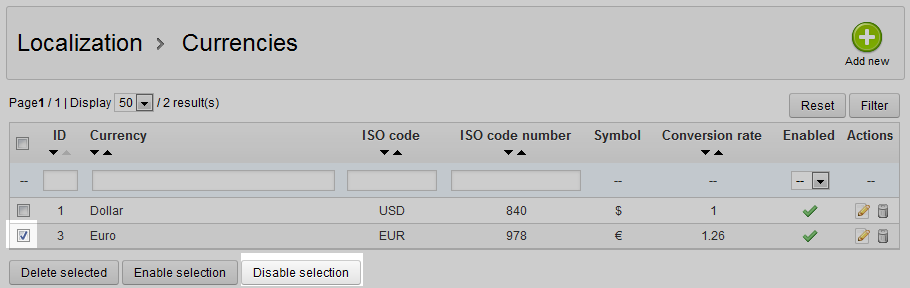
- This brings you to the Currencies list screen. From here, locate the currency you want to disable and select the checkbox to the left side of that row. You may select more than one currency if you wish. Once selected, click the Disable Selection button that is located underneath the currency list.
- Once disabled, the list will refresh and you will see a red X in the Enabled column for the currencies you were working with.