When configuring your product settings in PrestaShop 1.5, you may want to change how your quantity discounts are determined. To set the Quantity discounts option in PrestaShop 1.5, just perform the following steps.
To set the Quantity Discounts Base On option in PrestaShop 1.5:
- Log into your PrestaShop 1.5 dashboard.
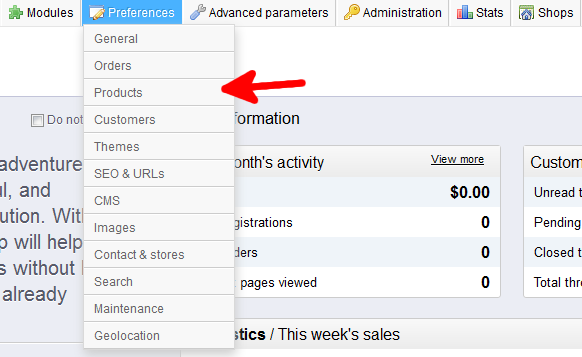
- Using the top menu bar, hover over the Preferences tab and select the Products option.
- You are now on the Preferences : Products screen. Look for the setting named Quantity Discounts Base On. From here you ahve two radio button options: Products and Combinations. Select the radio button next to your choice.
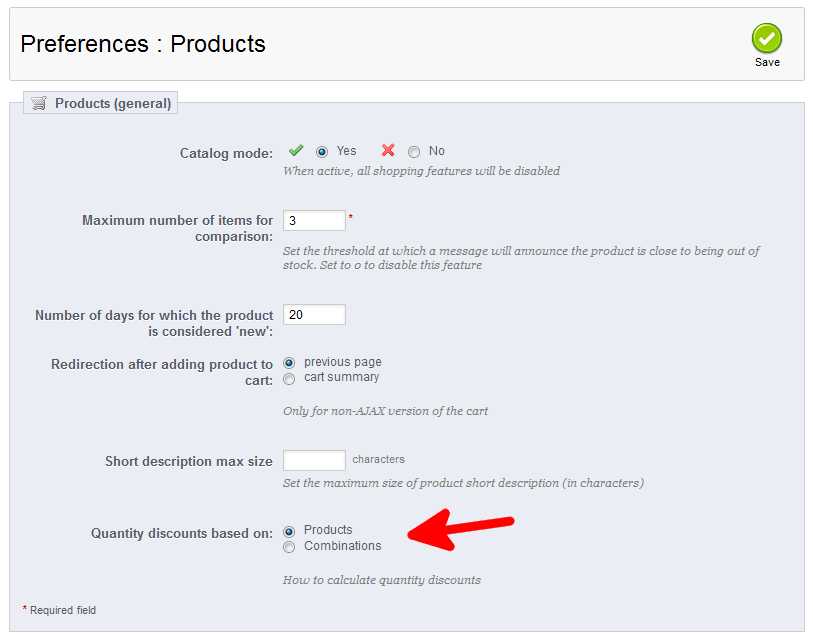
- Click on the green Save button to save your changes.


That is how you set your Quantity discounts base for PrestaShop 1.5.