Part of your store configuration in your store will guide the customer as they add items to their shopping list. You can control where they go. For instance, do you want to take them back to the page they were on to continue shopping? Or, do you want to bring them to the cart summary so they can view their selections? This tutorial shows how to change how a customer redirected after adding an item. To change the redirection page after a customer adds an item in PrestaShop 1.5, simply use the following steps.
To change page redirection after adding products to a cart in PrestaShop 1.5:
- Log into your PrestaShop 1.5 dashboard.
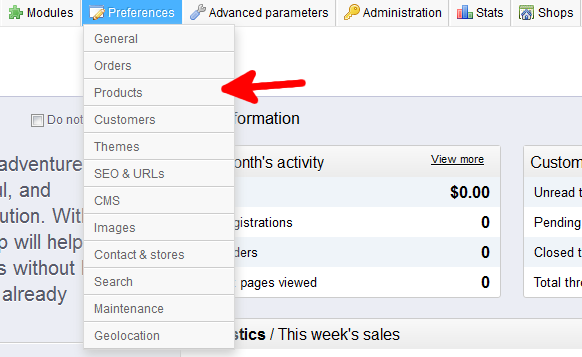
- Using the top menu bar, hover over the Preferences tab and select the Products option.
- From the Preferences : Products screen, find the field labeled Redirection after adding product to cart. Here you will see radio button options for Previous Page and one for Cart Summary. Click the radio button next to your choice.
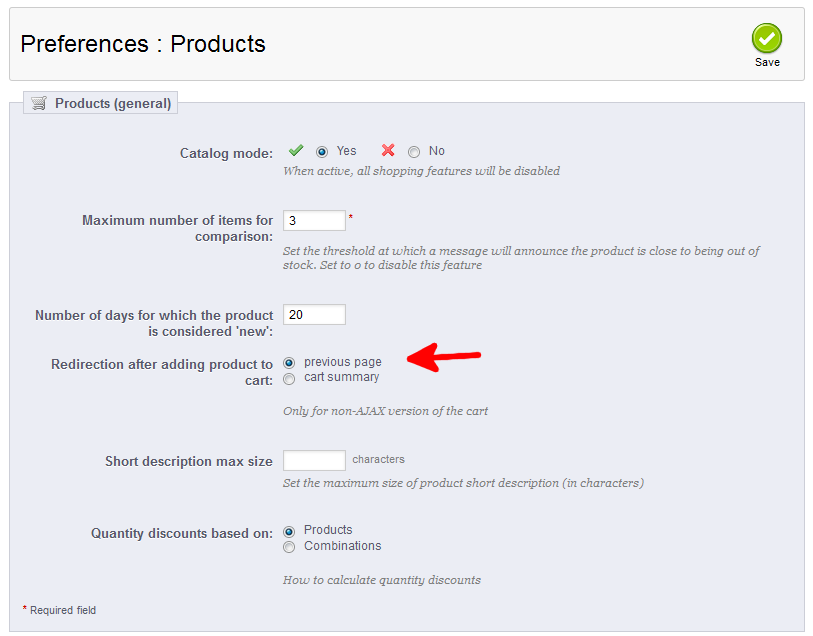
- Once completed, click on the green Save button to save your setting.


You have now set the Redirection page for your customer after they add an item in PrestaShop 1.5.