After setting up a new tax in PrestaShop 1.5, your next step is to create a new tax rule. After you have setup a tax rule by following the directions on this page, you can then associate this tax rule to a product.
Taxes can be a bit confusing, if you have any questions please see our article here on understanding taxes and tax rules in PrestaShop 1.5
Adding a new tax rule in PrestaShop 1.5:
- Log into your PrestaShop 1.5 Dashboard
- In the top menu, hover over Localization and then click Tax Rules
- In the top right menu, click Add new
- Type in a Name for the tax rule, select the green check next to Enable, and then click Save and stay in the top right menu
In our testing, we set the Name to:
US-VaBeach Rate (4.5%) - After you click Save and stay, a new button will appear in the top left menu – Add new tax rule. Click the Add new tax rule button.
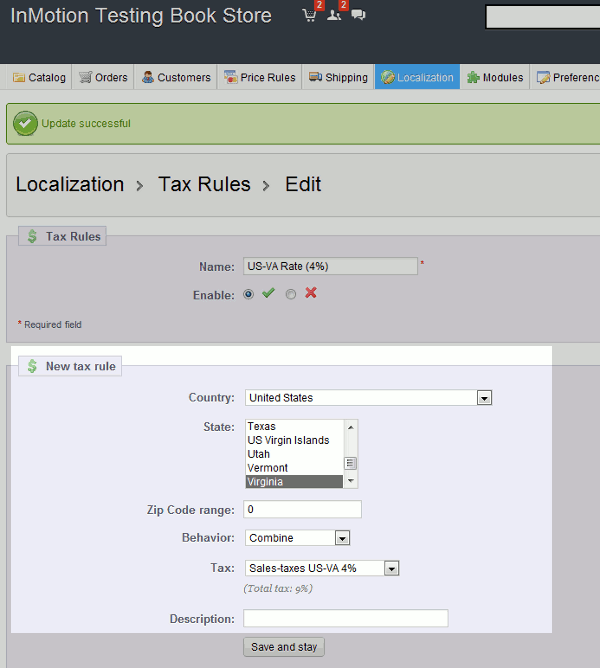
- Under New tax rule, enter the following details:
Country Select the appropriate country from the drop down list Zip Code range You can define a range (eg: 75000-75015) or a simple zipcode Behavior Define the behavior if an address matches multiple rules:
This Tax Only: Will apply only this tax
Combine: Combine taxes (eg: 10% + 5% => 15%)
One After Another: Apply taxes one after another (eg: 100€ + 10% => 110€ + 5% => 115.5€)Tax Select a tax from the drop down menu Description Enter a description about this tax rule You can see below how the Virginia tax rule is setup:
- When finished enter the New tax rule information, click the Save and stay button (which is under the Description field)
