When configuring your order settings in PrestaShop 1.5, you may want to allow the option to use multiple shipping addresses. Allowing multiple shipping addresses enables a customer to send different products to different recipients, perhaps as gifts.
How does multi-shipping work from a user’s perspective?
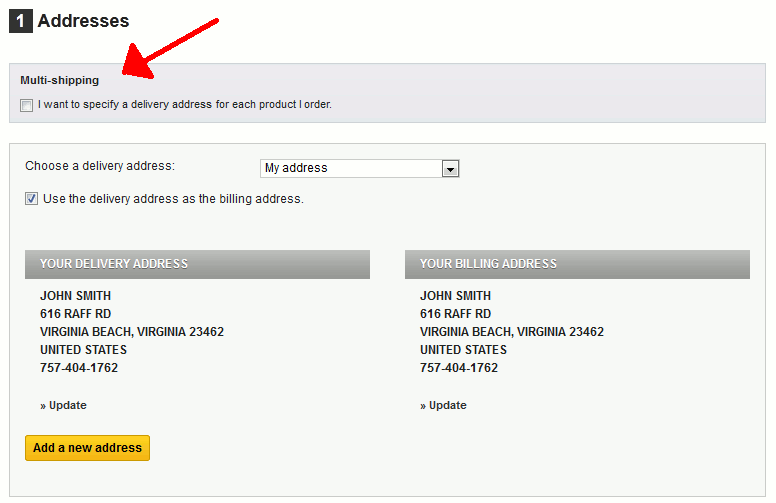
If a user has multiple products in their cart, during checkout they will be presented with the following option:
Multi-shipping:
I want to specify a delivery address for each product I order.If they select this option, they will move to step 2 below.
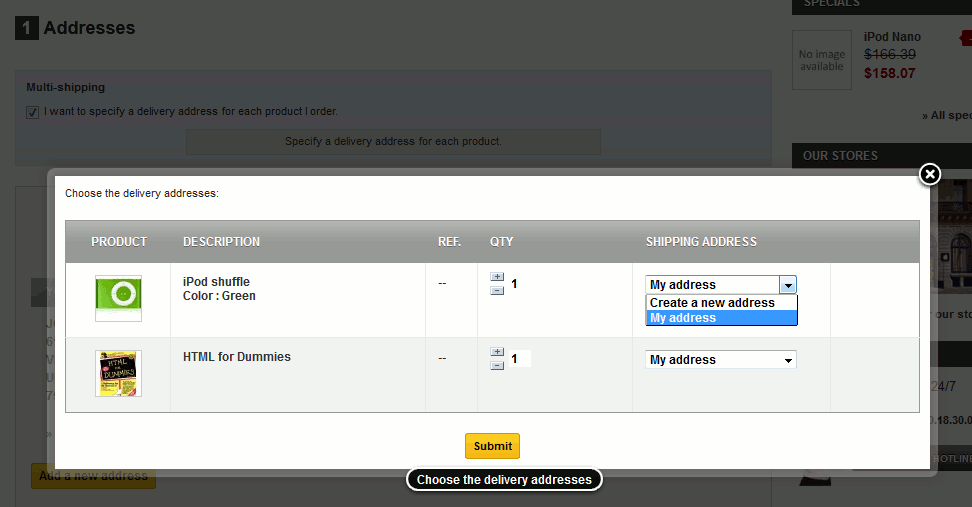
For each item in their shopping cart, the user can specify a unique delivery address.
To set a Minimum Purchase Requirement in PrestaShop 1.5:
- Log into your PrestaShop 1.5 dashboard.
- Using the top menu bar, hover over the Preferences tab and select the Orders option.
- From the Preferences : Orders screen, find the Allow multi-shipping field and select either Yes to allow more than one shipping address, or No to force only one shipping address. The default setting for this option is No.
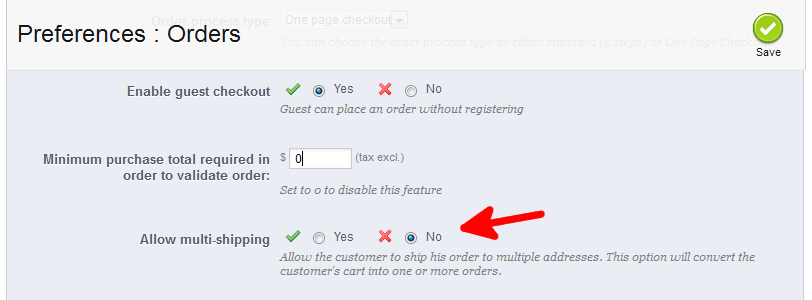
- Once finished, click on the Save button in the upper right corner of the screen.
You have finished setting the Multi-shipping option in PrestaShop 1.5.