
If you have a shopping cart built with OpenCart and you have a lot of Products, the product counts could be slowing your website down. Removing the product counts can dramatically increase your page load times, since it will not be querying the database for the information. Here’s how to remove the product counts in OpenCart if you have installed vQmod. If you are not familiar with vQmod, please read our guide on it.
- Download the extension from here:
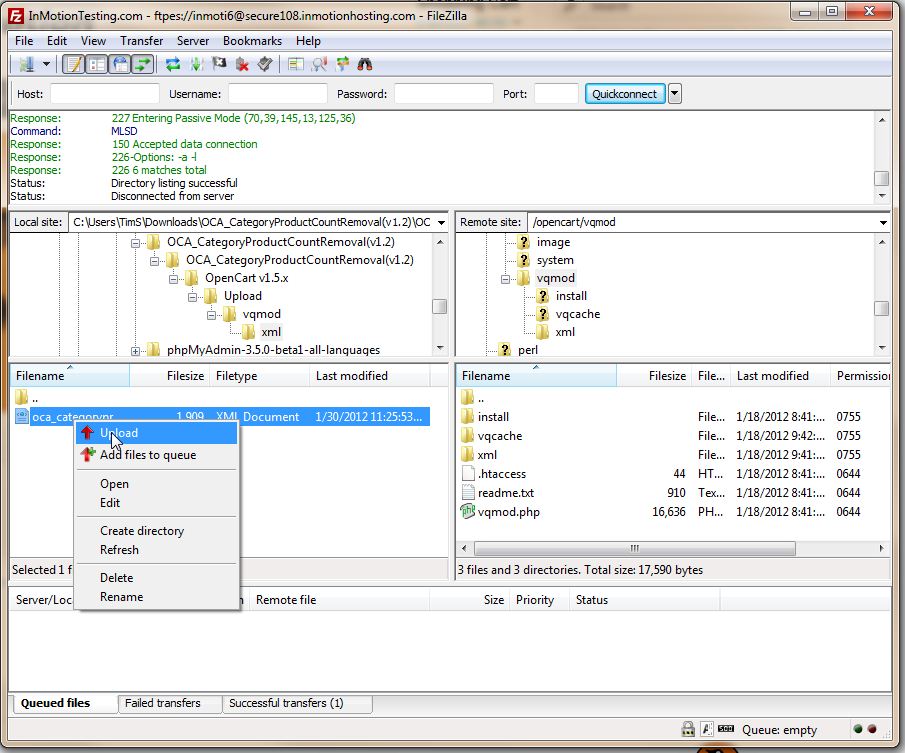
- Using FTP open a connection to your server and navigate to your OpenCart root directory
- Go to vQmod > xml on the window for the server
- Go to your download location on the local computer and open up the folder until you see the XML document.
- Upload the file to the vQmod > xml folder
OpenCart vQmod to Remove Product Counts
Now, when you visit your OpenCart website, you’ll see the product counts removed.
Before:

After:

For more step-by-step guides and practical tips, visit our Drupal Education Channel.