
In the previous tutorials we learned how to use the sales report and the products purchases report. The products viewed report shows what products were viewed by your website’s visitors, how many times each product was viewed and the percentage of total views. Accessing the products viewed report is done through your OpenCart Dashboard.
- Log into your OpenCart Dashboard
- Go to Reports > Products > Viewed
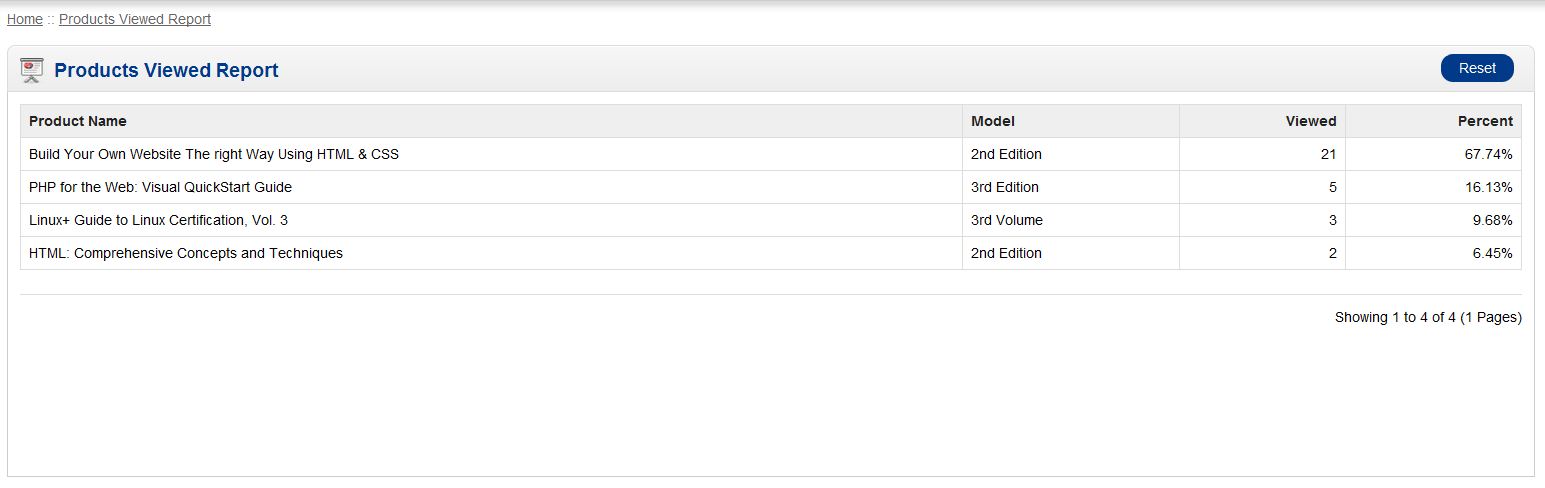
This report can be a benefit to gain insight into what your site’s visitors are interested in. You can also compare what products are being bought versus what products are being viewed to try to determine if there’s a reason products are not selling (i.e. price and availability). You’ll need to use the Products Purchases and the Products Viewed reports together.
If you have further questions, please feel free to ask a question on our support center website.
To learn more about InMotion’s web hosting options, click on OpenCart Hosting Accounts on InMotion Hosting.