
Since the Internet is global; your customers may want to purchase or see the purchase price of a product in their native currency for the country they live in. You can easily add a new currency to OpenCart through the OpenCart dashboard.
- Log into your OpenCart Dashboard
- Go to Localisation >> Currencies
- Click “Insert”
- Fill in the fields for the currency you’re going to add
- Click “Save”

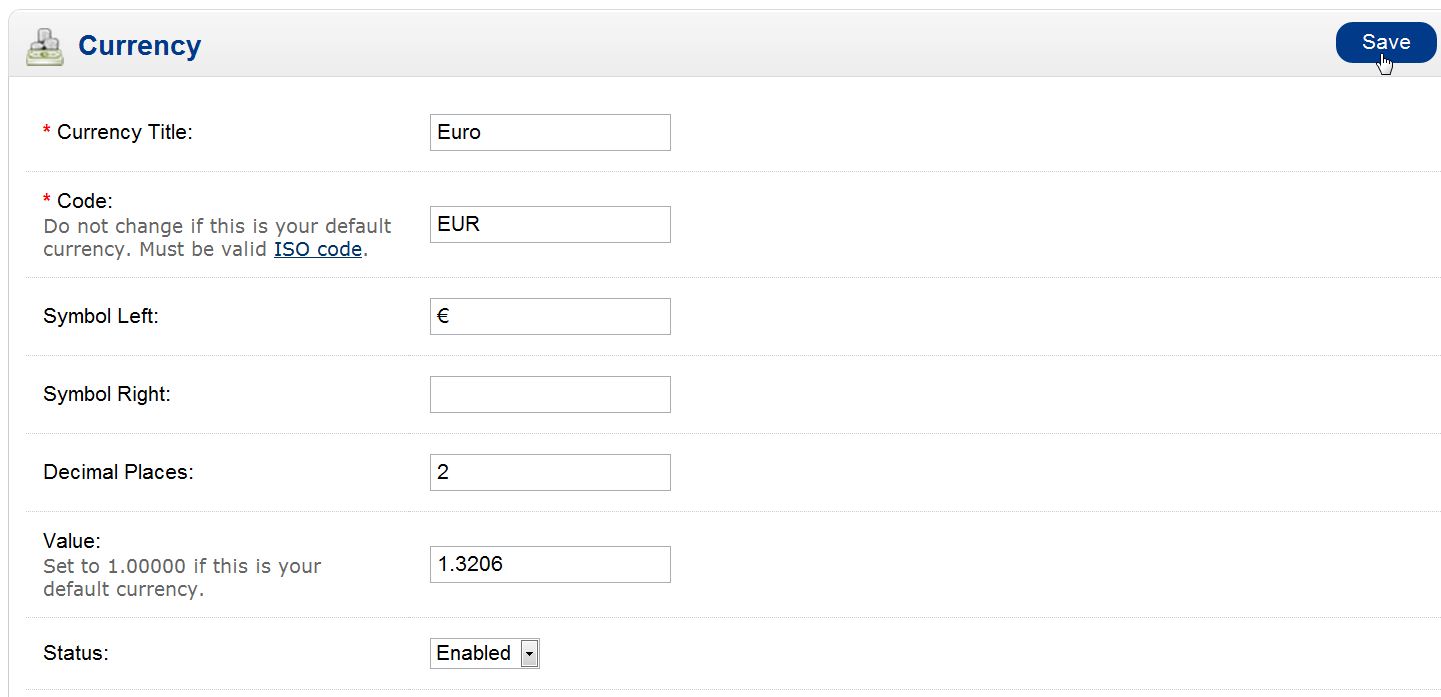
| Currency Title | This is the title you want to name the currency |
|---|---|
| Currency Code | This is the ISO Code standard for the currency |
| Symbol Left | Use this for currencies that use symbols on the left |
| Symbol Right | Use this for currencies that use the symbol on the right |
| Decimal Places | Show how many decimal places are in the site |
| Value | This is the exchange rate based on your default currency |
Please keep in mind that you will need to update the “Value” when the exchange rate changes for the new currency. The exchange rate does not update on its own.
If you need further assistance please feel free to ask a question on our support center. Need a hosting solution for OpenCart? Go to OpenCart Hosting Accounts with InMotion Hosting!