
The powered by OpenCart footer link appears on every page and is an easy way for you to promote and help support OpenCart. Alternatively, this makes it easy for hackers to determine what your shopping cart is built with and target. It’s relatively easy to remove using File Manager in cPanel.
- Log into cPanel
- Go to File Manager
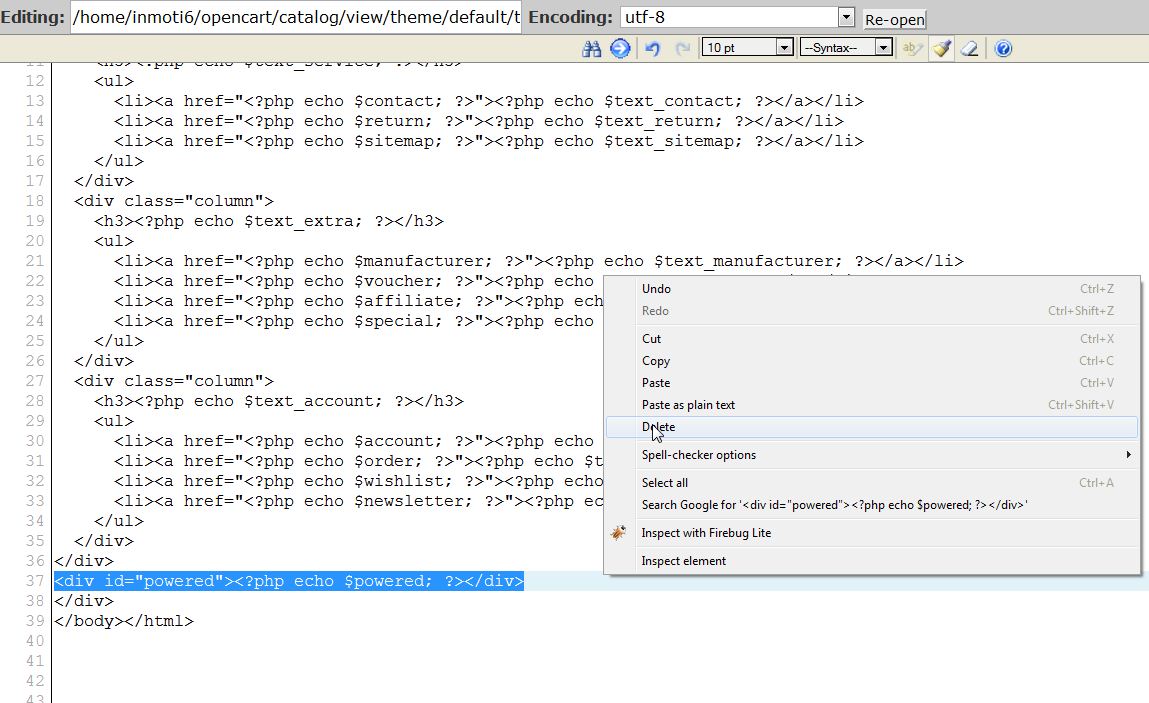
- Go to /catalog/view/theme/default/template/common/footer.tpl
- Right click on the file and open with the code editor
- Find the line “<div id=”powered”><?php echo $powered; ?></div>” and delete it
- Click “Save Changes“
Now, when you visit your website, the footer is removed.
| BEFORE: | AFTER: |
|---|---|

|

|
For more step-by-step guides and practical tips, visit our Drupal Education Channel.