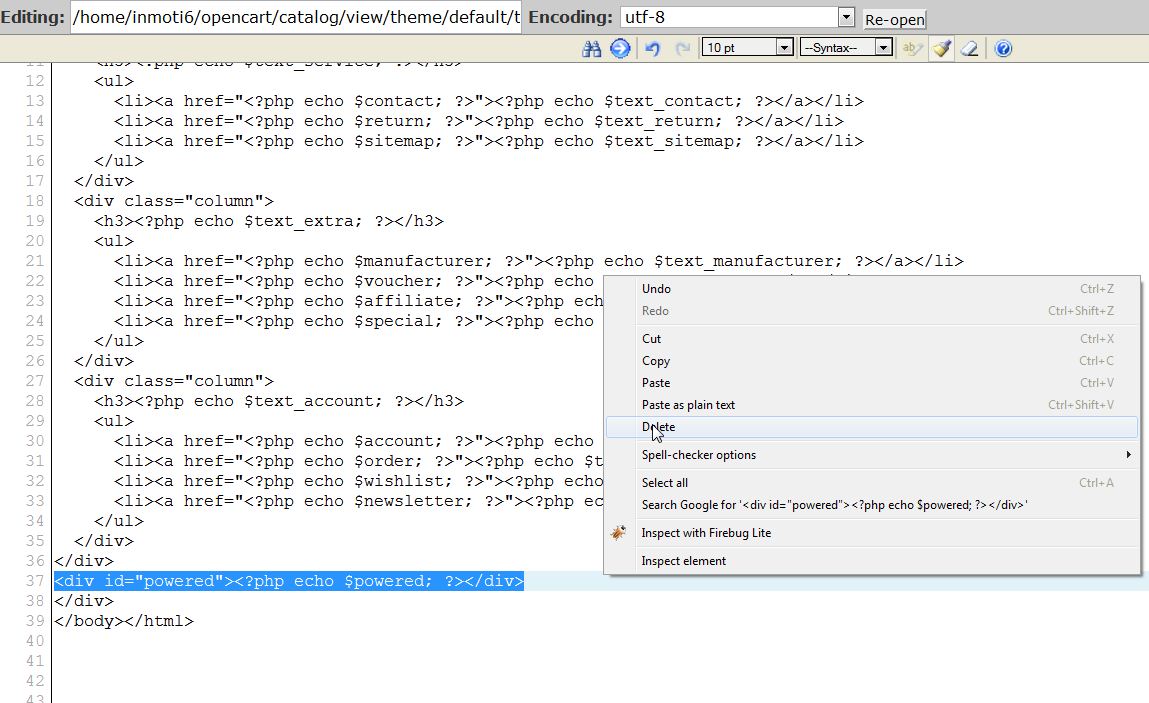
The powered by OpenCart footer link appears on every page and is an easy way for you to promote and help support OpenCart. Alternatively, this makes it easy for hackers to determine what your shopping cart is built with and target. It's relatively easy to remove using File Manager in cPanel.

  1. Log into cPanel
  2. Go to File Manager
  3. Go to /catalog/view/theme/default/template/common/footer.tpl
  4. Right click on the file and open with the code editor
  5. Find the line "<div id="powered"><?php echo $powered; ?></div>" and delete it
  6. opencart_footer_alter_1

  7. Click "Save Changes"

Now, when you visit your website, the footer is removed.

BEFORE:AFTER:
opencart_footer_alter_2 opencart_footer_alter_3

If you need further assistance please feel free to ask a question on our support center.

Like this Article?

Login to comment.

Your Opinion Matters

... but we need to know what you're thinking!

I'm Tim Sisson, your friendly Community Support technician, and I wrote the article you're looking at now. I like to think it's perfect, but I'm sure you have some suggestions. Please, let me know what they are!

Feedback
Your Email Address
Because we'd like to talk with you!

Latest Questions

If you need some help, submit your question to our Community!
We guarantee a response within 60 minutes (8am - 9pm EST, Monday - Friday)
Ask a Question!
Recent Questions
  1. Old Email address-I need to update to a new one
  2. training SpamAssassin using sa-learn?
  3. I'm trying to create a second WP blog on my domain.

Need more Help?

Search

Ask the Community!

Get help with your questions from our community of like-minded hosting users and InMotion Hosting Staff.

Current Customers

Chat: Click to Chat Now E-mail: support@InMotionHosting.com
Call: 888-321-HOST (4678) Ticket: Submit a Support Ticket

Not a Customer?

Get web hosting from a company that is here to help. Sign up today!