
The cPanel 11.38 release disabled the ability to turn off security tokens, and it’s now a forced option for all cPanel users. This was done to provide an extra layer of security and to help prevent CSRF (Cross-site request forgery) attacks.
What do security tokens look like?
When you’re logged in to either cPanel or WHM, you’ll now see cpsess followed by a number in the address bar.
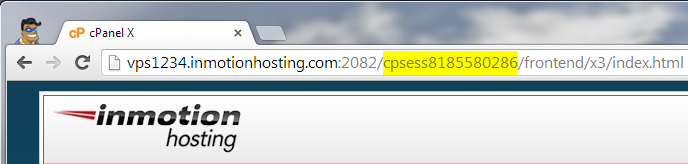
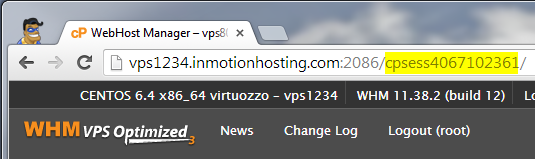
In this case you can see I’ve highlighed cpsess8185580286 when trying to access cPanel and cpsess4067102361 when trying to access WHM, these are the security tokens for those particular login sessions of mine.
What do security tokens do?
A security token is simply a string of text that is uniquely generated on each login session. It can help ensure that an unauthorized user does not hijack a user’s session, and will require re-authentication if the security token does not match what is stored for the session.
A good example of when you might encounter issues with cPanel security tokens, would be trying to bookmark a particular page in cPanel. For instance if you bookmarked the Addon Domains page in cPanel the URL would be something like this:
https://vps1234.inmotionhosting.com:2082/cpsess515294239/frontend/x3/addon/index.html
If you try to come back to that page a day later, your cPanel login security token isn’t going to match that URL. So you’ll be presented with the cPanel HTTP error 401 Invalid security token message.
Now you can simply type in your cPanel password and click on Click here to proceed with the current request
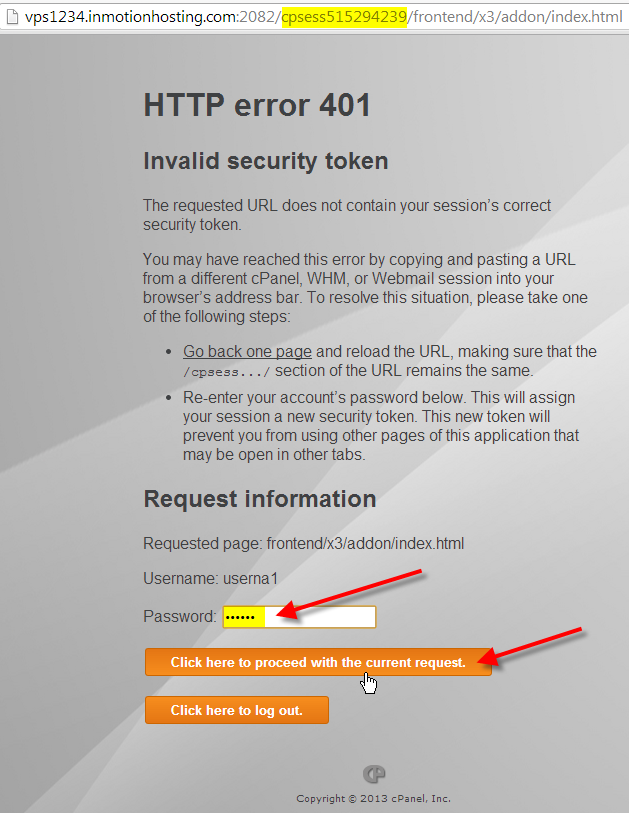
The address bar will now show that you’re using a different security token for this session
https://vps1234.inmotionhosting.com:2082/cpsess8212191699/frontend/x3/addon/index.html
What can I do if I can’t login to cPanel now?
If you’re having issues logging into cPanel because you keep getting the HTTP error 401 Invalid security token error. You should be able to type in your cPanel password again, or you can try to log out of cPanel and clear all of your cookies for the server.