
One of the steps you can take to stop spam scripts is to enable SMTP Restrictions in WHM. This particular feature will prevent users from bypassing the mail server to send mail. When enabled it only allows delivery through MTA, mailman, and root connect to remote SMTP servers.
NOTE: This setting does require that you have root access to WHM in a VPS/Dedicated server.
Using SMTP Restrictions
- Login to WHM as the “root” user.
- In the left-side menu pane, look for and then click on SMTP Restrictions
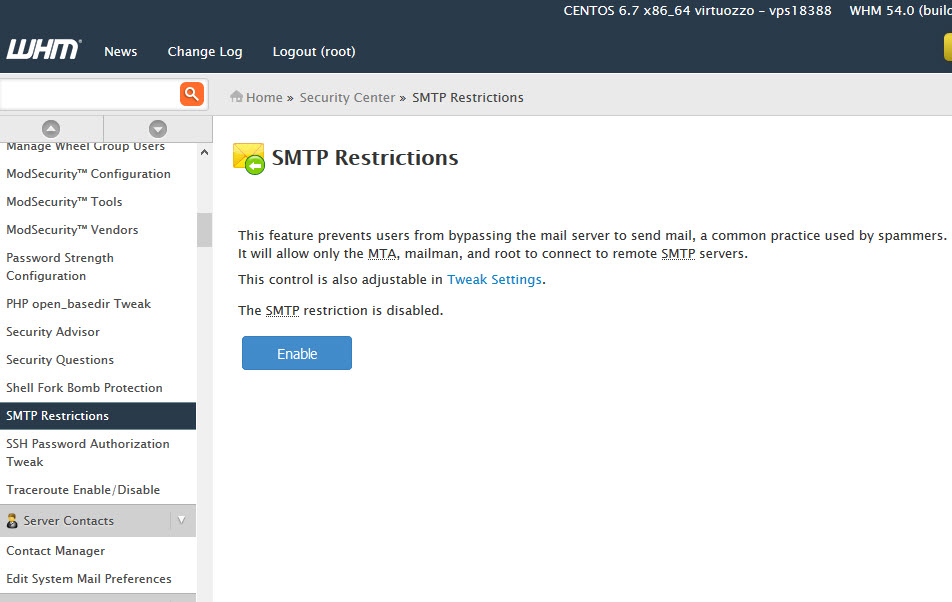
- Click on Enable in order to turn on SMTP Restrictions
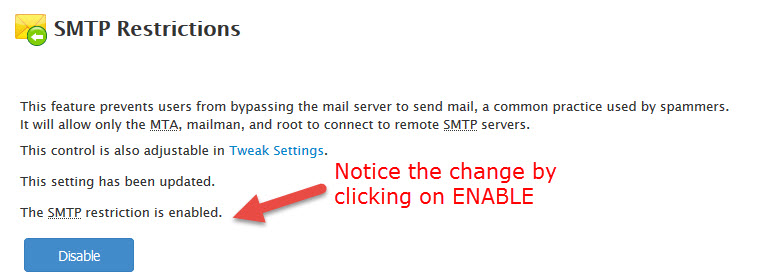
For more information on SMTP Restrictions settings in WHM, please see the official documentation.
You can also click on Tweak Settings and use the Mail section to make further changes to the configuration.
Learn more about cPanel hardening from our Managed VPS Hosting Product Guide.
 Enjoy high-performance, lightning-fast servers with increased security and maximum up-time with our Secure VPS Hosting!
 Linux VPS cPanel or Control Web Panel Scalable Website Migration Assistance