


The InMotion Hosting Backup Manager plugin integrates cPanel with the remote backup system to allow you to maintain your backup data. For instance, you can perform a restoration, monitor the backup storage capacity, and control which data is backed up and how often. In this guide, you can learn how to enable/disable remote backups using Read More >
Product Guides
Welcome to the InMotion Hosting Product Guides
This page helps you get started, whether you’re setting up a new website or exploring our products. Select a product below to access tutorials, setup guides, and troubleshooting articles tailored to your hosting plan or service.
Web Hosting

Dedicated Hosting
Dedicated Linux servers that are completely customizable to meet your enterprise level needs.

Business Shared Hosting
Quickly launch your web presence with our affordable Business Shared Hosting plans.

Reseller Hosting
Be your own web hosting provider to your customers with our affordable Reseller Hosting plans.
Reseller VPS Hosting
Be your own web hosting provider to your customers with our affordable Reseller VPS Hosting plans.

Managed VPS Hosting
Learn how to get the most out of your Managed VPS Hosting plan using cPanel/WHM or Control Web Panel.
Hosting for WordPress
Our Hosting for WordPress on cPanel is fine-tuned to deliver superior performance, security, and provide best-in-class hosting.
UltraStack ONE for WordPress
Our all-in-one Hosting for WordPress platform is the ultimate choice for website owners who want to simplify their hosting and management process for their high-performance servers.
Website Services & Software

Web Design Services
Get detailed answers to your questions about our Website Design and Maintenance Services, including getting started guides and common tasks.

Backup Manager
Give yourself peace of mind with Backup Manager. Automatically backup your files, databases, email and cPanel account settings on an external server.

Softaculous
Easily install, upgrade, and manage over 400 web applications, site builders, and frameworks with Softaculous. Save time from manually uploading installation files and configuring databases with cPanel.
Guides That Apply To Every Product
Billing, email, security, and account management work the same no matter which plan you’re on. Start here when the topic isn’t tied to one product.
Still Stuck?
Community Forum
Ask other customers and our support team in the Community Support Forum.
Open a Ticket
For server-specific issues that need eyes on your account.
Live Chat
24/7 Support for customers with active hosting plans.
What is a WordPress Network (Multisite)?
A WordPress Network, also known as a Multisite network, is a feature of WordPress that allows you to run multiple WordPress sites from a single installation of WordPress. With a WordPress Multisite network, you can create multiple sites with their own unique domain names, themes, and plugins, all managed from a single dashboard. WordPress Multisite Read More >
What TLDs Can Be Sold Through Enom as a Reseller?
eNomCentral.com gives you the ability to re-sell many different Top-Level Domains or TLDs. With the latest release of new TLD’s you may be wondering which ones you can register. In this article, we will go over some of the many TLDS that you can sell through eNom. Popular TLDs These are some of the most Read More >
How to Create a Slideshow in WordPress with Metaslider
(This article assumes you have a live WordPress website. Not quite there yet? That’s okay! We can get you up and running with WordPress Hosting.) Image Slideshows, also known as sliders are a popular way to display pictures on your site and catch the eye of visitors. The popular MetaSlider plugin for WordPress makes it Read More >
Adding a Cookie Notice for GDPR in WordPress
If you are using cookies on your WordPress site and have visitors from Europe, you should let them know. This requirement is due to the EU adopting the General Data Protection Regulations also known as GDPR. You can easily comply with GDPR requirements by implementing a cookie notice using a 3rd party plugin. (This article Read More >
How to Use the Site Health Feature in WordPress
WordPress 5.2 will be introducing a great feature to get the most out of your web performance that checks exactly what it’s called – Site Health. Imagine any time you’re concerned about how you could enhance your WordPress website’s speed, security, and user experience. This new built-in feature allows you to easily view a lot Read More >
Creating Logins on my Shared Hosting Plan
Do you need to provide access to your Shared Hosting account? All Shared Hosting plans include a single cPanel username, but you do not have to share it. cPanel’s Manage Team feature lets you create separate cPanel logins with limited roles for developers or teammates. You can also grant narrower access to files, databases, email Read More >
Manage my Cloud Server Overview
InMotion Hosting’s Cloud Server plans include a helpful “Manage My Cloud Server” page. This is a one-stop page where system administrators can access and utilize tools for maintaining a healthy server. From here you can do things such as restart your server, manage SSH Keys, check bandwidth, review load average, and create or revert a Read More >
How to Use the WordPress Scan Validator
Are you preparing to backup your WordPress Hosting site? As we continue our series on the Duplicator plugin, we will now show you how to run the WordPress Scan Validator. This can help you check your website files for file issues that may arise during a WordPress Backup and can provide information about the amount Read More >
How to Provide User Access in WordPress Hosting

One of the conveniences of using WordPress hosting is the ability to have multiple people with different user access levels. These user access levels can be defined by the role you provide within WordPress. This enables you to provide access to multiple users who can access your site without providing them access to the hosting Read More >
How to Edit the Application List in Softaculous using WHM
If you’re not familiar with it, Softaculous is a utility provided within cPanel that allows your users to install applications onto their account. It’s a great tool since it not only tracks all of the installations and versions, but it also provide installation management for your users. However, what if you want to limit the Read More >
How to Restore a Database With Backup Manager
InMotion Hosting’s Backup Manager for automated backups has an option to restore databases separately from files and folders. This is similar to restoring backups with cPanel MySQL Databases Below we cover how to restore a backup with cPanel Backup Manager. Note: The Backup Manager is a different tool than cPanel Backup and Backup Wizard. Restore Read More >
How to Rebrand Softaculous using WHM
Softaculous is an application within cPanel that allows your users to install many different types of applications for their account. Using the interface provided within WHM, you can re-brand the site with your logo and site name. Follow the directions below to learn how to change branding in WHM. Looking for a dependable Dedicated Server Read More >
How to Enable or Disable Backups for Users of your VPS
Backups for a VPS are important for any one who is building a website. However, there are occasions where you may be managing a client who is taking up much more space than they should. In these cases, you may need to stop an account from making a backup because they are eating up precious Read More >
Add Schemas With the Insert Headers and Footers WordPress Plugin
InMotion Hosting now offers superior WordPress Hosting that can fit into any budget. There are many WordPress web design techniques to improve search engine optimization (SEO) – e.g. popular keywords, plugins (notably Yoast or All in One SEO), and schemas. Schema.org schemas provide a small box of important info along with search engine results for Read More >
How to Transfer Product Subscriptions in the Web Pro Administrator
As a WebPro, you have the ability to transfer product subscriptions to new or existing accounts. It is easier to manage account details when you transfer your domain or hosting account to the WebPro interface. Follow the steps below to learn how to use the WebPro Transfer feature for either a domain or hosting subscription. Read More >
What Can I Do With My WordPress Admin Account?
When you first installed WordPress, you may remember first creating your username and admin password. And as it turns out, you can do a lot of fast and dangerous things with your admin account. But with great power comes great responsibility. So we’ve put together a few examples of what you can do with your Read More >
What Changes When You Brand a Reseller Account in InMotion Hosting?
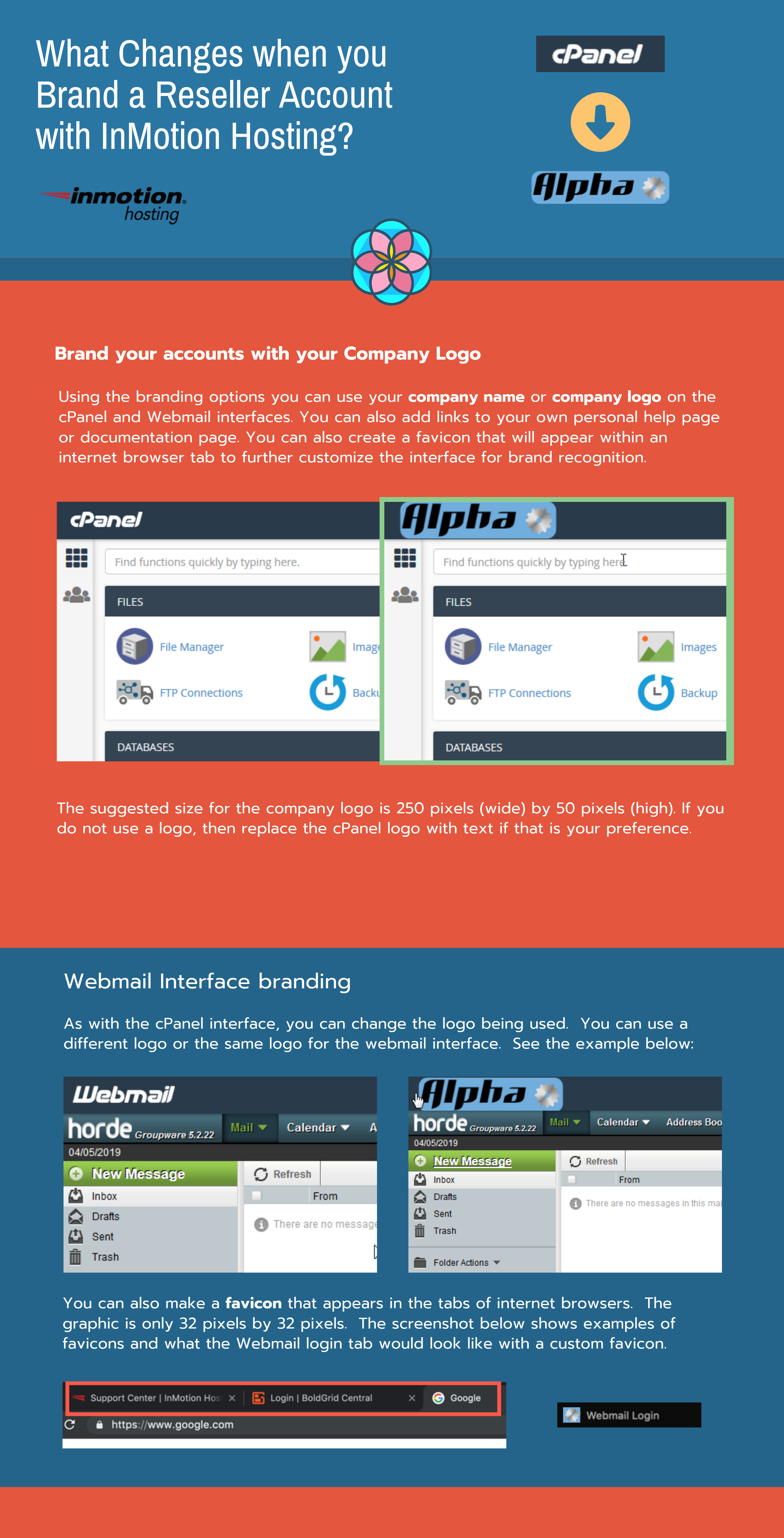
Branding a Reseller Hosting Account Reseller hosting accounts allow you to add your own company branding to the cPanel and Webmail interfaces that your customers can see. You also have the option of adding favicons or creating links for specific help or documentation pages. The logos for cPanel are replaced by either your company logo Read More >
How to Create a Site for your Sports Team Using WordPress

If you participate in a sports league then you may want to create a website where you can share information or media for your team. This is especially helpful for a coach who may want to provide team updates, schedules and other important information. Using InMotion Web Hosting Services you can build a low-cost, quick Read More >
How to Show IP Address Usage in WHM
An IPv4 address is the numerical address in a format of “1.2.3.4” used by your Linux VPS, and other systems connected to the internet, for online communication. Even your smartwatch, and other Internet of Things (IoT) appliances include an IPv4, or IPv6, address. At times you may want to audit logs on how your IP Read More >