When managing your cPanel as a web hosting reseller, you may or may not want to allow the individual cPanel accounts to have access to the Advanced DNS Zone Editor.
The Basic DNS Zone editor allows the user to choose between two record types, the A record and the CNAME record. Users of the basic editor also cannot view or modify any of the default records that are generated during cPanel account creation.
The Advanced DNS Zone Editor allows the users to choose from three record types, A records, CNAME records, and TXT records. It also allows the viewing, editing, and deletion of the default records that are generated during the cPanel creation.
Whatever you decide, using the reseller account, you are able to enable or disable this option for all cPanels. Follow along below as we demonstrate how to do that within your WebHost Manger (WHM).
Enabling or Disabling the Advanced DNS Editor in WHM
- Log into your WHM dashboard.
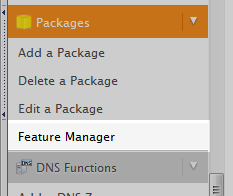
- Once you are in the WHM, look for the Feature Manager tool which is located under the Packages category.
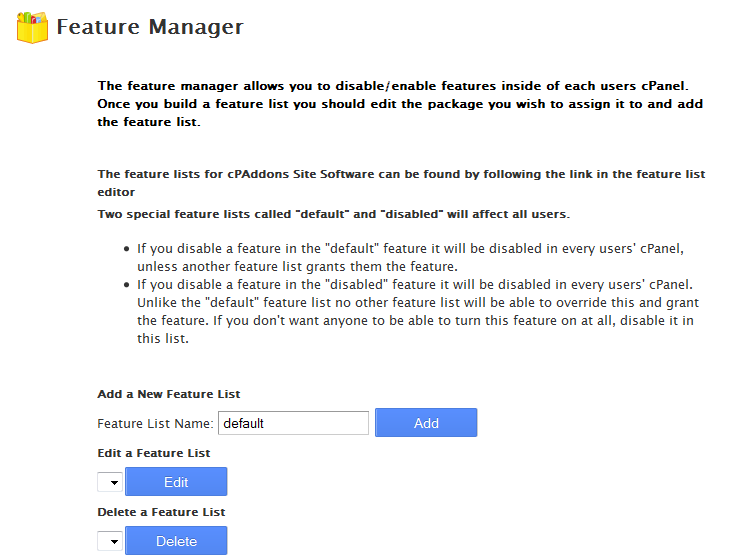
- This leads you to a page where you can select the feature template list you want to edit. In this case, there is not one, so we can create one by giving a name to the list we want to create. For example, we name this list Default. Click Add to create the feature template.
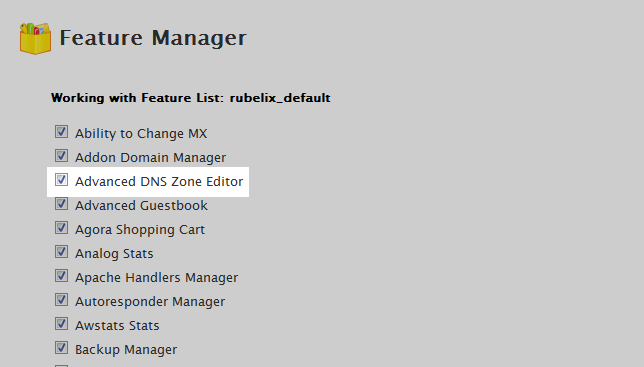
- The new list name will appear under the Edit a Feature List section. Make sure it is selected in the dropdown and click the Edit button. From here you will see a long lost of Features that are offered for accounts with this list. Select or Deselect the checkbox next to the Advanced DNS Zone Editor field.
- Scroll to the bottom and click on the Save button. This saves your configuration and all accounts that use that configuration will have/ not have the Advanced DNS Zone Editor according to your configuration.
