SPF records are necessary in order to help prevent your email addresses from being spoofed. If you do not understand what spoofing or an SPF record is, please see our Guide to SPF Records. This article is part of that series where we demonstrate how to set up a basic SPF record from within your cPanel.
Creating a basic SPF Record within cPanel
- Log into your cPanel dashboard.
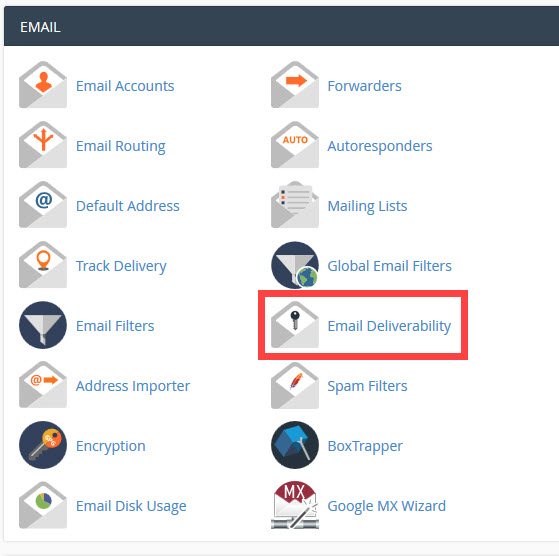
From the main cPanel page, look for the Email category. From there, click on the Email Deliverability icon.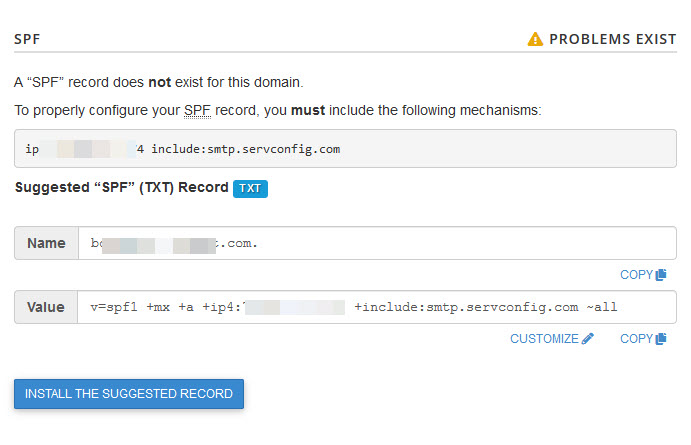
This brings you to the Email Deliverability screen. If you have more than one domain listed, then select the domain you wish to manage first. You will then see the records for the domain that you have selected. Find the SPF subsection. cPanel will have a suggested SPF record for you if you do not an entry there already. Make sure that the option “~all” is at the end of the suggested entry.This is important as it adds the ‘-all‘ to the end of the record so that all addresses that fail the other checks will be rejected.- Click on INSTALL THE SUGGESTED RECORD in order to save the entry. This will enable the SPF record for that domain name.
The server will use the SPF record that you just set for the domain that you have selected.