Joomla 2.5 has reached its end of life as for 12/31/2014. Please be advised this may be a security risk to your website. You can view more information about the end of life here.
In our last article, we showed you how to use spacers in a Joomla 2.5 plugin’s XML file. Using spacer fields, you can add HTML to your plugin’s settings page.
How to use Spacers to add HTML
The key to using HTML within a plugin is to change:
- > to >
- < to <
If we wanted to insert the following link into a plugin’s settings page:
InMotion Hosting provides the <a href=’https://www.inmotionhosting.com/joomla-hosting/best-joomla-hosting.html’>best joomla hosting</a>
… We would need to change the code to:
InMotion Hosting provides the <a href=’https://www.inmotionhosting.com/joomla-hosting/best-joomla-hosting.html’>best joomla hosting</a>
Example Spacer code that prints HTML
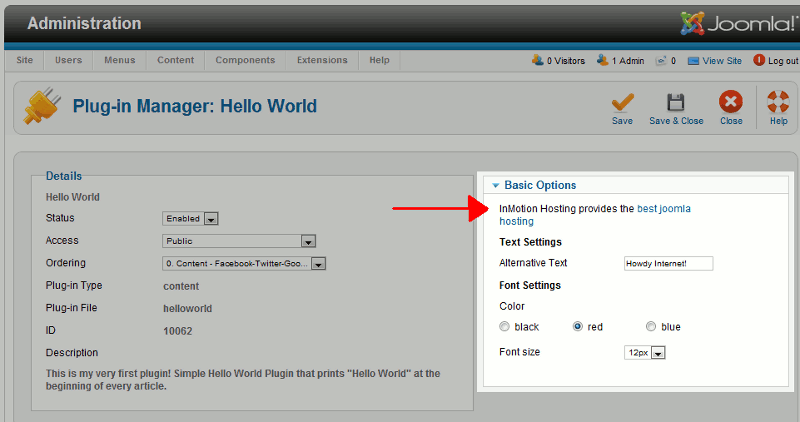
The following is the code we added to our plugin’s XML file and the results:
<field name=”great-joomla-hosting” type=”spacer” description=”InMotion Hosting provides joomla hosting” label=”InMotion Hosting provides the <a href=’https://www.inmotionhosting.com/joomla-hosting/best-joomla-hosting.html’>best joomla hosting</a>” />