Within WHMCS you will set up emails to be sent out automatically to your clients. These emails will go out to confirm the actions of the client, such as when they first sign up, place an order, etc. There are email templates that you can customize for different scenarios. This article demonstrates how to create a general email signature that will appear at the end of these emails. This is done in a special section so that it affects all the email templates.
Did you know? Not all hosting companies provide a free license for WHMCS. InMotion does with all Reseller Hosting plans and it’s just one of the many features available.
Adding a Standard Email Signature
- Log into your WHMCS admin dashboard.
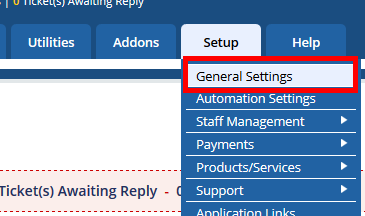
Hover over the Setup tab and click General Settings.
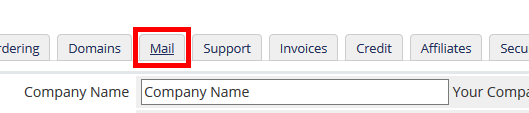
Click on the Mail tab.
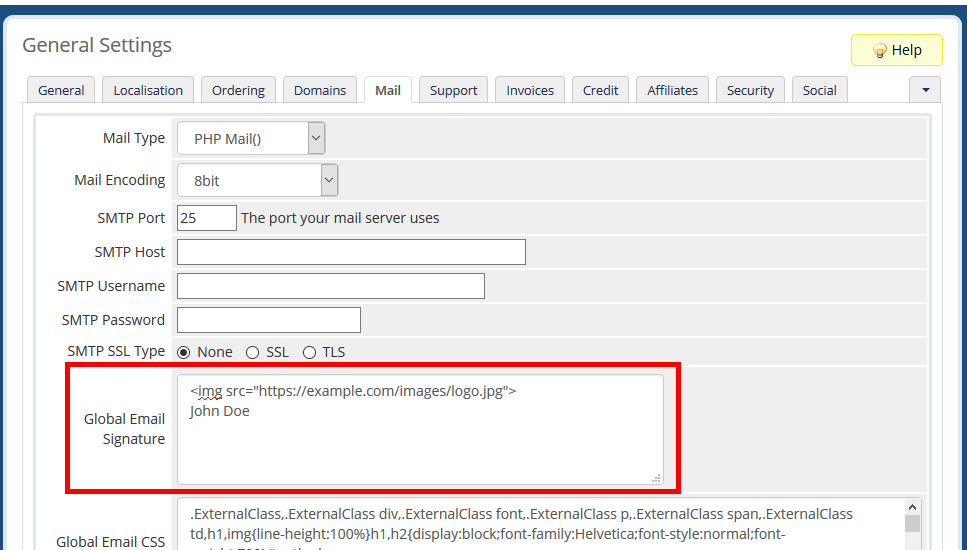
Edit the Global Email Signature box by adding your desired signature. You can use both text and HTML in your signature.
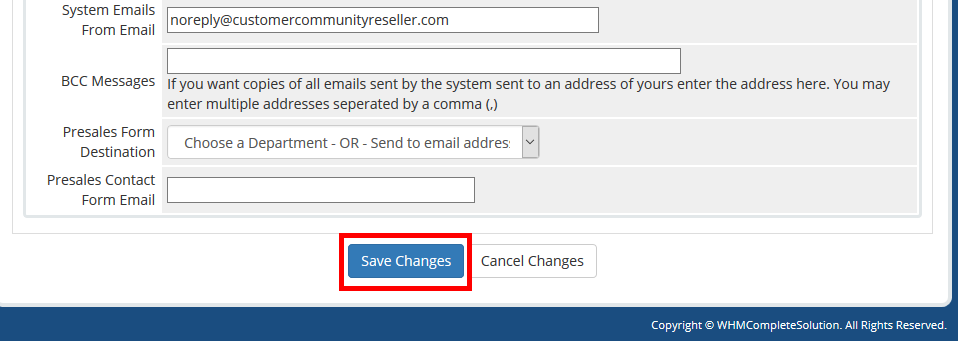
Click Save Changes at the bottom of the page.
Once your new signature is saved it will appear at the bottom of the different emails you send to your customers.
To learn more about using WHMCS to manage your reseller account activities, please see:
- How to Configure WHM Contact Manager
- WHMCS General Settings Overview
- Creating Hosting Plans in WHMCS and Syncing with WHM
- How to Add a New Server in WHMCS
- How to Add a Payment Gateway in WHMCS
- How to Change Default Currencies in WHMCS
- How to Configure Domain Settings in WHMCS
- How to Link Your Reseller Server to WHMCS