


Skip to content
InMotion Hosting 25th Anniversary Logo InMotion Hosting Home
Celebrate 25 Years With Our Anniversary Offers See Deals
25 Years Strong. A Thank You Letter from Our Founders. Read the Letter
Now Open: InMotion Agency Partner Program. Founding spots available. Apply Today
  • Resources
    Resources
    Server Management
    Website Services
    Compare InMotion Hosting
    Resource Center
    Blog
    Support Center
    Join Us
    Careers
    Affiliates Program
    Agency Program
    Refer Friends
  • Contact Us
    +1 757 416 6575
    +44 2045 763722
    Chat with Sales Chat with Sales
    Get Support Get Support
    Contact Us
    System Status
  • Support Center
  • Login
  • Live Chat
  • AMP Login
  • Support Center
  • 0
Main Menu
    InMotion Hosting 25th Anniversary Logo InMotion Hosting Home
  • VPS Hosting
  • Dedicated Servers
    Managed Dedicated Servers Protect Your Business with Secure,
    Scalable Infrastructure
    Bare Metal Servers Custom Bare Metal Solutions for Your
    Unique Workloads
    High Capacity Servers Our Most Powerful Servers Optimized for
    High-Demand Workloads
    Eco-Friendly Dedicated Servers Sustainable Servers at Competitive
    Prices
  • Cloud
    Managed Private Cloud NEW Full Control Over Scalable
    Managed Infrastructure
  • WordPress
    Shared Hosting for WordPress Classic Hosting with Email and cPanel Included
    UltraStack ONE for WordPress Superior Speed for Mission-Critical Sites
    VPS Hosting for WordPress Optimized Servers with Flexible Control
    View All WordPress Solutions
  • Products
    Hosting for Any-Size Websites
    Shared Hosting Start Strong With Reliable Hosting, Real Support, and a Platform That Scales With You
    Hosting for WordPress Optimized Hosting for WordPress with Email and cPanel Included
    VPS Hosting Flexible, High-Performance Hosting With Full Control
    Dedicated Server Hosting Protect Your Business with Secure, Scalable Infrastructure
    Reseller Hosting White-label cPanel/WHM for Resellers
    Hosting Add-Ons Upgrade Your Hosting with Tools for Security, Email, and more
    View All Web Hosting
  • Partners NEW
    Agency Partner Program
    Agency Partner Directory
    Agency Hosting Solutions
  • 0 Cart
  • Start a Live Chat
  • Get Support
  • +1 757 416 6575
  • +44 2045 763722
  • +1 757 416 6575
    +44 2045 763722
  • Support Center
  • 0 Cart
  • Login
Support Center
    • Product Guides
      Managed VPS HostingCloud Server HostingDedicated HostingReseller HostingShared HostingWordPress HostingInMotion CentralBackup ManagerWebProSoftaculousSprout InvoicesweForms
    • Knowledge Base
      Account Management PanelBackups and RestorationsDatabasesDomain NamesEmailGitGoogle WorkspaceHacked WebsitesNGINXPHP-FPMSearch Engine OptimizationSecurityServer TechnologiesSSH and Root AccessSSL CertificatesWebsiteWebsite Error Numbers
    • Education Channels
      AI ToolsAndroidAnsibleApacheBoldGridControl Web PanelcPanelCyberPanelDiscordDrupalHubSpotiPhoneJoomla 4Live BroadcastingMagentoMoodleOpenCartPrestashopWebHost Manager (WHM)WooCommerceWordPress
    • Tools & Resources
      What is My IP AddressBlacklist CheckBounce Back ParserDomain CheckerEmail ConfigurationVisual DNS LookupFree Favicon Generator
    • Community
    • Blog
  • Community
  • Blog
  1. InMotion Hosting Home
  2. Support
  3. Email
  4. Professional Email
  5. Set Up MX and SPF Records for InMotion Hosting Professional Email

Set Up MX and SPF Records for InMotion Hosting Professional Email

DerrellDerrellUpdated on December 23, 2025 2 Minute Read
Set Up MX and SPF Records for InMotion Hosting Professional Email
AI Summary

If you’ve subscribed to InMotion Hosting Professional Email, your domain’s DNS records are typically configured automatically.

However, if the MX and SPF records were not added or you need to verify and set them manually, this guide will walk you through the steps. ⚠️ Important: Incorrect or duplicate DNS records can cause email delivery issues.

Once your MX and SPF records are correctly configured and propagation is complete, your Professional Email service will begin routing messages through Titan’s secure mail servers.

Basic summary
Set Up MX and SPF Records for InMotion Hosting Professional Email

If you’ve subscribed to InMotion Hosting Professional Email, your domain’s DNS records are typically configured automatically. However, if the MX and SPF records were not added or you need to verify and set them manually, this guide will walk you through the steps.

⚠️ Important: Incorrect or duplicate DNS records can cause email delivery issues. Ensure that only the correct MX and SPF records for Professional Email are present.

Prerequisites

  • Access to your domain’s DNS zone via AMP or cPanel
  • A current Professional Email subscription with InMotion Hosting
  • Your domain is pointed to InMotion Hosting name servers (if DNS is managed here)

Step 1: Determine Where to Edit DNS Records

If Your Domain is Hosted on an InMotion Hosting cPanel Server

  1. Log in to your Account Management Panel (AMP).
  2. Under your Professional Email subscription, click DNS Zone Editor.
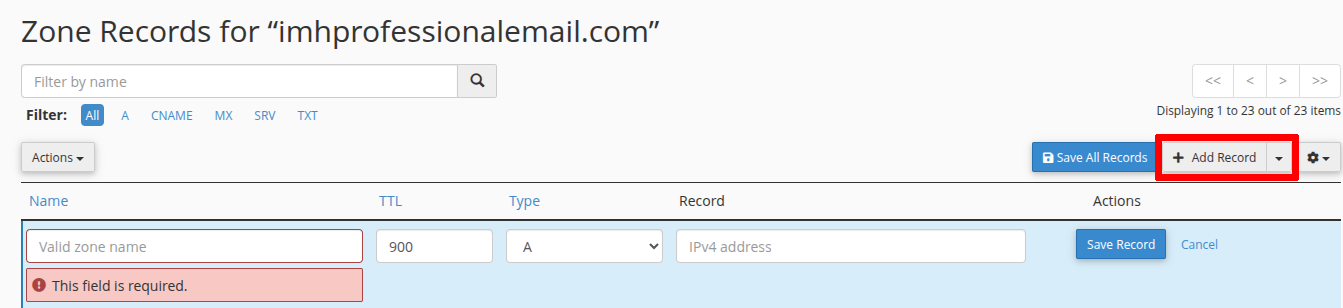
  3. You will be redirected to the cPanel Zone Editor. Click Manage next to your domain.
  4. Click + Add Record to begin adding the necessary entries.
If Your Domain is Used Only for Professional Email (No Web Hosting)

  1. From your AMP home page, click DNS Zone Editor under the Professional Email section.
  2. Scroll to Zone File Records to verify if the correct MX and SPF records already exist.
  3. If they’re missing, navigate to Add Record on the page and proceed to the next section to add them manually.

Step 2: Add Required DNS Records

Add the following records using the Add Record (in cPanel) or Submit Record (in AMP) button in the Zone Editor.

MX Records

Add both of the following MX records:

MX Record 1

  • Type: MX
  • Name / Valid Zone Name: yourdomain.com or yourdomain.com. (use trailing dot if required)
  • Destination: mx1.titan.email
  • Priority: 10
  • TTL: 14400

MX Record 2

  • Type: MX
  • Name / Valid Zone Name: yourdomain.com or yourdomain.com.
  • Destination: mx2.titan.email
  • Priority: 20
  • TTL: 14400

SPF (TXT) Record

  • Type: TXT
  • Name / Valid Zone Name: yourdomain.com or yourdomain.com.
  • Text: v=spf1 include:spf.titan.email ~all
  • TTL: 14400

Remove any existing MX or SPF records to prevent conflicts. Conflicting entries can cause email delivery failures and authentication issues.


Step 3: Verify DNS Changes

After saving the records:

  • Use a tool like MXToolbox to verify the MX and SPF records.
  • DNS propagation may take up to 6–8 hours, during which email delivery may be inconsistent.

Conclusion

Once your MX and SPF records are correctly configured and propagation is complete, your Professional Email service will begin routing messages through Titan’s secure mail servers. If issues persist after propagation, verify your DNS settings and consider contacting InMotion Hosting Support.

Summarize and Research with AI
Share on Social Media
Derrell Willis
Derrell Willis Manager, Developer Relations

More Articles by Derrell
Related Articles
  • Set Up MX and SPF Records for InMotion Hosting Professional Email
  • How to Purchase InMotion Hosting Professional Email in AMP

Post navigation

UCEPROTECT RBL Email Scam: What It Is and How to Respond
HTTP Error Codes: What They Mean and How to Fix Them
Table of Contents
  1. Prerequisites
  2. Step 1: Determine Where to Edit DNS Records
    1. If Your Domain is Hosted on an InMotion Hosting cPanel Server
    2. If Your Domain is Used Only for Professional Email (No Web Hosting)
  3. Step 2: Add Required DNS Records
    1. MX Records
    2. SPF (TXT) Record
  4. Step 3: Verify DNS Changes
  5. Conclusion
Related Articles
  • Set Up MX and SPF Records for InMotion Hosting Professional Email
  • How to Purchase InMotion Hosting Professional Email in AMP

Need More Help?

Search our Help Articles
Current Customers

Get Support: Log into AMP
Call: 757-416-6575 x2
Ticket: Submit a Support Ticket

Get Reliable Web Hosting

Chat: Chat with Sales
Email: [email protected]
Call: 757-416-6575 x1

Get web hosting that grows with your business. Our all-in-one hosting platform gives you everything your website needs to scale - so you can focus on the next big thing for you and your business.

InMotion Hosting 25th Anniversary Logo

InMotionHosting.com provides web hosting, cloud-based solutions and managed services to businesses and entrepreneurs across the globe.

Follow Us

Web Hosting
  • Shared Hosting
  • Hosting for WordPress
  • Managed Hosting for WordPress
  • UltraStack ONE for WordPress
  • VPS Hosting
  • Cloud VPS
  • Dedicated Server Hosting
  • Bare Metal Servers
  • Enterprise Hosting Solutions
  • OpenMetal Cloud IaaS
  • Reseller Hosting
  • Reseller VPS
  • Minecraft Server Hosting
  • eCommerce Hosting
  • RamNode Cloud
  • InMotion Cloud
  • Pricing
Hosting Tools
  • WordPress
  • WooCommerce Hosting
  • Drupal Hosting
  • Joomla Hosting
  • cPanel Hosting
  • PHP Hosting
  • Magento Hosting
  • PrestaShop Hosting
  • Laravel Hosting
  • Ubuntu Hosting
  • Linux Hosting
  • WebPro Dashboard
  • WordPress Website Builder
  • Domain Names
  • Professional Email
Support
  • Live Chat
  • +1 757 416 6575
  • +44 2045 763722
  • Support Center
  • Resources
  • Community Support
  • WordPress Tutorials
  • RamNode Deployment Guide
  • InMotion Solutions
  • Managed Hosting
  • Website Migrations
  • Data Center Locations
  • Los Angeles Data Center
  • Ashburn Data Center
  • Amsterdam Data Center
About Us
  • Contact Us
  • About Us
  • Blog
  • News
  • Careers
  • Affiliate Program
  • Refer a Friend
  • Student Web Hosting
  • Sitemap
  • Cookies Settings
  • Accessibility (ADA) Settings

Copyright © 2002-2026 InMotion Hosting, Inc. All Rights Reserved. InMotion Hosting® is a registered trademark of InMotion Hosting, Inc.

Terms of Service | Privacy Policy | DPA | Accessibility Statement | Legal Inquiries
Do Not Sell My Personal Information | Limit Use of My Sensitive Personal Information

By continuing to visit any webpage within this website, each visitor agrees to the use of cookies and tracking technologies, and further agrees to abide by our Universal Terms of Service, Privacy Policy, Cookie Policy, and any other terms and policies posted on this website.