
Sometimes, you may need to log into cPanel to get to check your email. Webmail users may find that the webmail timezone doesn’t match with your location. Below we cover how to specify a time zone within your preferred Webmail application.
Horde
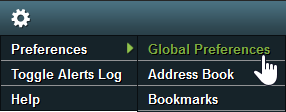
- At the top-right, hover over the Tools icon, Preferences, and Global Preferences.
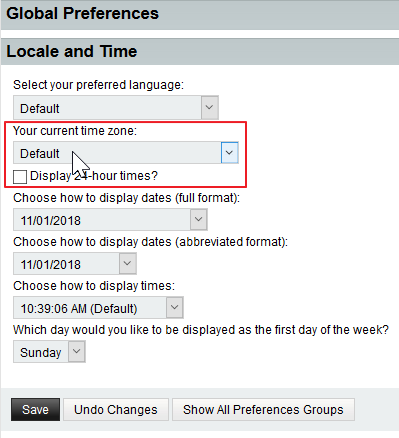
- Select Locale and Time on the left.
- Specify the time zone from the drop-down menu and save your changes.
Roundcube
- Press Settings in the upper-right corner.
- Press User Interface beside Preferences.
- Specify the time zone from the drop-down menu before pressing Save at the bottom.

SquirrelMail
Although SquirrelMail is discontinued in cPanel version 78 and newer, users on older cPanel versions without it disabled from WHM can use the steps below to.
- Select Options at the top.
- Press Personal Information from the left.
- Specify the time zone from the Timezone Options drop-down menu and press Submit.

These changes only affect the Webmail. If you need to change your timezone at the web server, you can edit your PHP time zone within your php.ini file, MySQL time in SSH, and server time from WHM.