Configuring Free Shipping in Magento

Magento gives the admin the capability to easily configure free shipping. Free shipping can be a great selling point to convince your website visitors to make a purchase from your website. Enabling and configuring free shipping is accomplished in the Magento Admin Panel.

  1. Log into your Magento Admin Panel
  2. Go to System -> Configuration
  3. Select “Shipping Methods” from the left menu pane
  4. mage_flat_ship_1

  5. Open “Free Rate” by clicking on it
  6. mage_free_ship_2

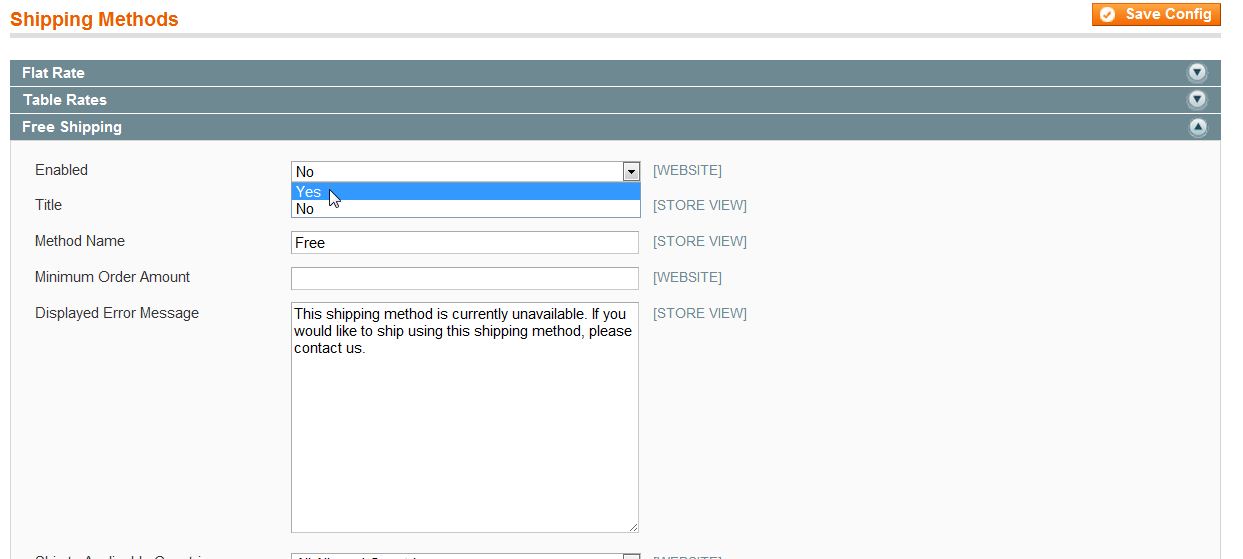
  7. Fill in the fields as needed. Make sure to set the first field “Enabled” to “Yes
  8. mage_free_ship_3

  9. Click “Save
Share this Article
Carrie Smaha
Carrie Smaha Senior Manager Marketing Operations

Carrie Smaha is a digital strategy, web development, and SEO leader with 20 years of experience. She built her foundation in fast-paced agency environments before moving in-house to InMotion Hosting, where she leads go-to-market programs, agency initiatives, and technical product marketing that connects product capability to real customer decisions.

More Articles by Carrie