
Our PHP hosting services empower you to have full control over your PHP versions with the latest cPanel functionality. With just a few clicks, you can switch between different versions and even use different versions across sites in the same cPanel. This is especially helpful when upgrading older sites, troubleshooting, or dealing with third-party applications. Let’s take a look at how to make the most of PHP on all types of servers!
PHP Versions and Server Types
Our SysAdmins install the latest versions of PHP on our Shared, Reseller, and cPanel-based WordPress servers after testing and troubleshooting. The ‘default’ version of PHP for newly created sites is often one or two versions behind for the sake of stability— but feel free to update to the latest version as soon as it is available!
With VPS and Dedicated Servers, we trust you and your SysAdmins to manage PHP installation and updates. If you need help, though, our 24/7 Technical Support team is happy to install newer versions of PHP at your request!
Note: If you have a VPS or Dedicated Server, newer versions of PHP may need to be installed manually.
cPanel’s MultiPHP Manager
Just a few years ago, managing different cPanel PHP versions was an all-or-nothing ordeal. Older tools would change the PHP version for every site on a cPanel at once. Configuring different individual sites required awkward workarounds using .htaccess files. The latest versions of cPanel introduced a new tool, MultiPHP Manager, which simplifies the process. Click on the MultiPHP Manager icon in the Software section of cPanel to get started!

Note: Be sure to click on MultiPHP Manager and not MultiPHP INI Editor. The INI Editor is a different piece of software that helps you fine tune your PHP settings on individual sites.
Change the PHP Version on Your Sites
Now that you know what the MultiPHP Manager is, we’ll show you how to use it to change the PHP version for your sites.
Note: Before changing the PHP version on a website or application, we suggest performing a backup first. Once the PHP version has been changed, be sure to verify that your sites and applications are working as intended.
- Login to cPanel.
- Click the MultiPHP Manager link in the Software section of cPanel.
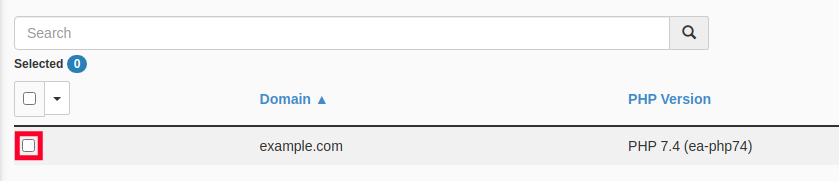
- Check the box for the site or sites you wish to update.
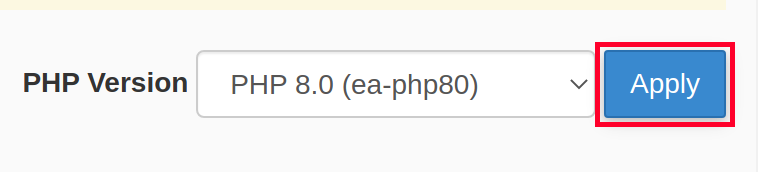
- Select the desired PHP Version from the drop-down menu.
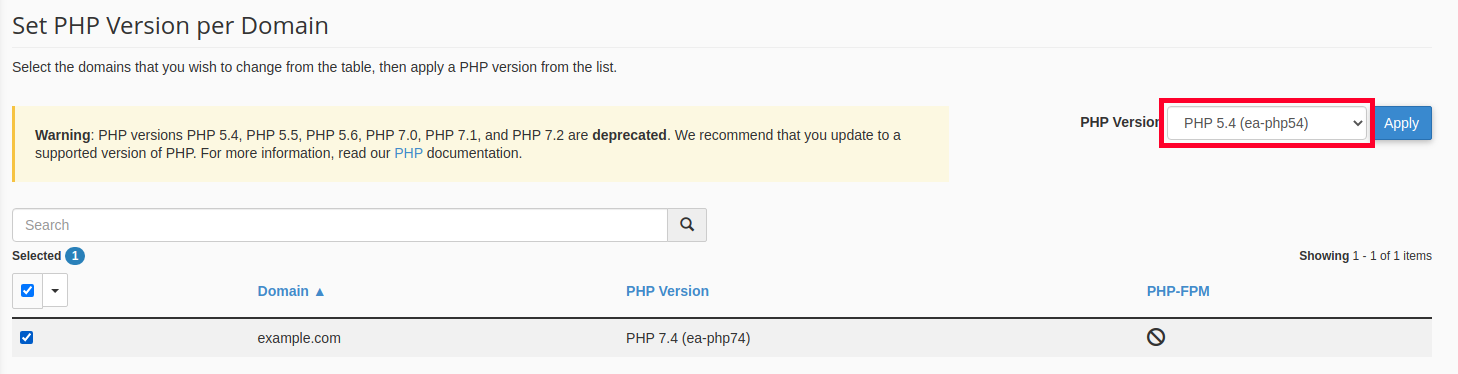
- Click the Apply button.
That’s all it takes to change the PHP version used on any site you choose. If you are having issues with a site and want to double-check the version of PHP in use, remember that you can always set up a PHPinfo page for the site as well. Learn more about cPanel from our Managed VPS Hosting Product Guide.
is latest php version is 7.3 or 8.2 ?
when I update site WordPress 6.4.2 to 6.4.3 my php automatically downgraded to 7.2 version. while i have 8.2 version of php on 6.4.2 version.
Hello Hassan,
While the MultiPHP Configuration tool in cPanel allows you to switch between PHP versions on shared, it is recommended to use 7.4 with WordPress installations as not all plugins are compatible with 8.0+ yet.