As you may know, Joomla 4 provides you with the TinyMCE editor by default. This interface basically mimics your standard what-you-see-is-what-you-get (WYSIWYG) editor in the style of Microsoft Word, Google Docs, or Open Office. You can highlight text, bold, italic, center, and do other basic formatting to make your text come alive. However, some web authors may prefer to use plain HTML as their tool of choice. For this latter group it is possible to disable the default TinyMCE editor and use only HTML. In this article, you will learn how to do that.
How to Disable the TinyMCE Editor in Joomla 4
Follow the steps below to learn how to disable your default TinyMCE editor in Joomla:
- Log into your Joomla admin area
- Click System from the left side navigation area
- Choose Global Configuration under System
- Navigate to the Default Editor dropdown under the Site tab
- Select Editor – CodeMirror
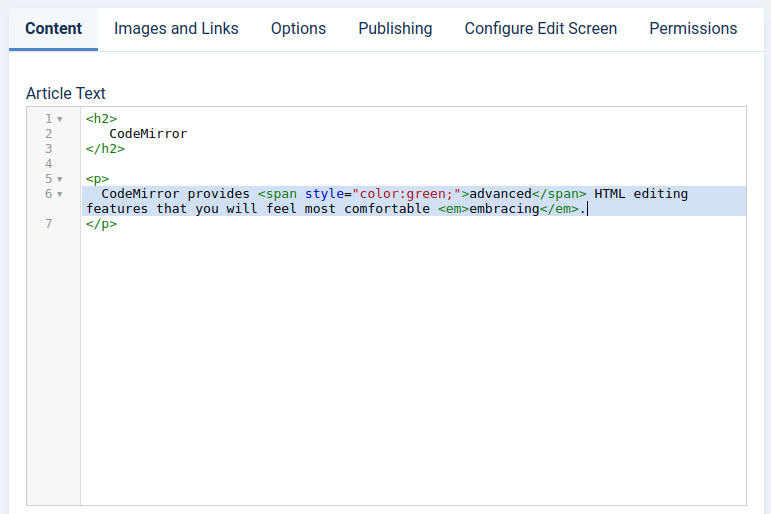
CodeMirror Vs No Editor
CodeMirror provides extra helper features for composing HTML, such as code completion and syntax highlighting. Alternatively, you can choose “Editor – None” for plain text with no additional features. In most cases involving direct HTML compositions, however, CodeMirror is likely your best bet.
CodeMirror more closely mimics editors like Sublime, Atom, BBedit, and many others that provide special support for certain languages. Remember that HTML is an interpreted markup language, so you don’t need any special compilers. If you prefer to edit your text with a local editor, you can always copy and paste the finished product into your Joomla editor window. In those situations, using CodeMirror vs no editor is not going to make any significant difference. CodeMirror is best for people who want to write HTML in the browser window. For other editors, copying and pasting is sufficient.