
As PHP-Fusion is free open-source software release under the AGPL (Affero General Public License), it displays a copyright notice in the footer of every page by default. This can be modified to a certain extent, and in this article I’ll explain the process.
Footers in PHP-Fusion
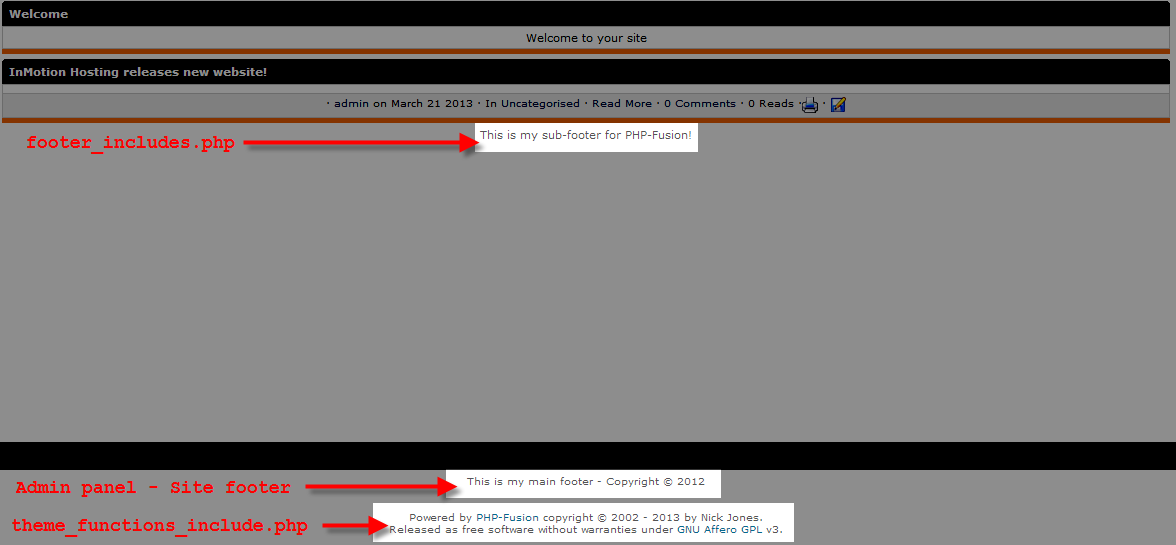
Below you can see the 3 different type of footers that are available in PHP-Fusion, this article is going to cover the copyright one at the absolute bottom of your pages. If you’d like, you can also read about modifying the footer in PHP-Fusion if you’re interested in changing the main footer, or modify the sub-footer in PHP-Fusion.
Changing the copyright footer
The copyright notice content is controlled by the /includes/theme_functions_include.php file, in my case the full path to this file is /home/userna5/public_html/phpfusion/includes/theme_functions_include.php. Using the steps below I’ll show you how you can modify what this footer displays.
- If you don’t already know how to, read our guide on how do I edit a file on my server?
- Once you have the file opened, around line 203 you’d want to look for the following code:
function showcopyright($class = “”, $nobreak = false) {
$link_class = $class ? ” class=’$class’ ” : “”;
$res = “Powered by <a href=’https://www.php-fusion.co.uk'”.$link_class.”>PHP-Fusion</a> copyright © 2002 – “.date(“Y”).” by Nick Jones.”;
$res .= ($nobreak ? ” ” : “<br />n”);
$res .= “Released as free software without warranties under <a href=’https://www.fsf.org/licensing/licenses/agpl-3.0.html'”.$link_class.”>GNU Affero GPL</a> v3.n”;
return $res;
}Now technically when making modifications to the PHP-Fusion copyright notice, you’d want to adhere to the guidelines laid out under the PHP-Fusion Free Licensing.
In this case the text “Powered by PHP-Fusion” is optional, so I’m going to be removing that for this example. I ended up with this text:
function showcopyright($class = “”, $nobreak = false) {
$link_class = $class ? ” class=’$class’ ” : “”;
$res = “Copyright © <a href=’https://www.php-fusion.co.uk'”.$link_class.”>PHP-Fusion</a> 2002 – “.date(“Y”).” by Nick Jones.”;
$res .= ($nobreak ? ” ” : “<br />n”);
$res .= “Released as free software without warranties under <a href=’https://www.fsf.org/licensing/licenses/agpl-3.0.html'”.$link_class.”>GNU Affero GPL</a> v3.n”;
return $res; }Here is the copyright footer before our edits:

Here it is after:



You should now understand how to modify your copyright footer in PHP-Fusion.