
When using a new content management system (CMS), you want to know how to undo changes while learning your way around base functions. You’ll need to understand ways to improve security, enhance workflow, and install plugins for OctoberCMS as you work toward the ideal website you want.
After you learn the base functions and get more in-depth with OctoberCMS, you’ll likely reach a point where you want to improve security and performance by removing unnecessary files and functions. This includes plugins you don’t need or can replace with another one which serves more than one purpose. By doing this, you can reduce the amount of vulnerabilities within your website.
Below we cover how to uninstall plugins in OctoberCMS.
Uninstall OctoberCMS Plugins
- Log into OctoberCMS.
- Click on the Settings button at the top.
- Click Updates & Plugins on the left.
- Click Manage plugins on the right.
- Click the checkbox to the left of the plugin you wish to uninstall and click Remove at the top.
- Click OK to confirm removing the plugin.
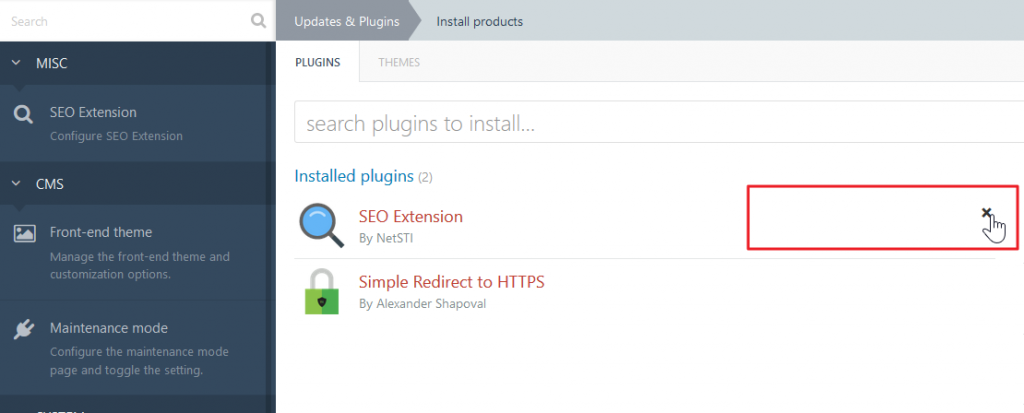
Alternatively, you can uninstall plugins from the +Install plugins section by clicking the X to the right of a plugin.

Are you enjoying your time with OctoberCMS? We hope so. Check our OctoberCMS section often to learn more about enhancing OctoberCMS for administrators and visitors with search engine optimization (SEO), security, and analytics integrations.
Meanwhile, check out our guide on strengthening email authentication to reduce the number of spam your server receives and ensure your emails aren’t marked as spam by other email providers. It only takes a few minutes and you can contact our free 24/7 Live Support if you’d like any assistance throughout the process.
Not sure you want to create a website from scratch anymore? Ask about our QuickStarter Package to get up and going today.