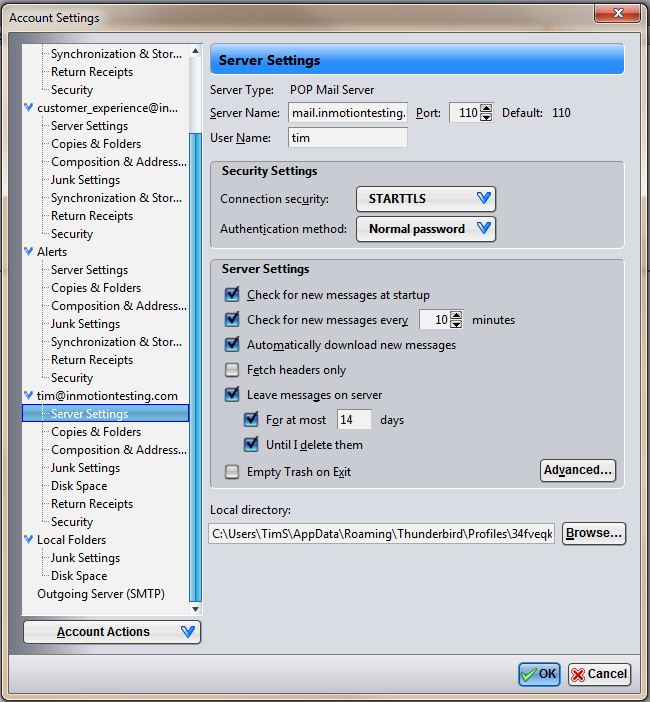
Thunderbird: Leave Copy of Email on Server with POP3 Carrie SmahaUpdated on June 17, 2024 1 Minute Read Most email clients, including Thunderbird, allow you to leave a copy of the emails in your inbox on the server. This can be important since by default POP3 email protocol downloads the email message from your inbox on the server, then deletes it. For more information about the differences between POP3 and IMAP please read out article. If you need help configuring your email client, please read our tutorial. Changing your settings to leave a copy on the server is easy. If this is an existing account, you’ll need to go to: Tools > Account Settings > Server Settings Look under the section “Server Settings” and be sure the check box is marked next to “Leave messages on server” On newer versions of Mozilla Thunderbird, this box is checked by default. If you need further assistance please feel free to contact out support department. Share this Article Carrie Smaha Senior Manager Marketing Operations Carrie Smaha is a Senior Marketing Operations leader with over 20 years of experience in digital strategy, web development, and IT project management. She specializes in go-to-market programs and SaaS solutions for WordPress and VPS Hosting, working closely with technical teams and customers to deliver high-performance, scalable platforms. At InMotion Hosting, she drives product marketing initiatives that blend strategic insight with technical depth. More Articles by Carrie Related Articles Transferring Emails from Your Old Host to InMotion Hosting How to Setup Office 365 DNS Records How to fix OLMAPI32.dll and WWLIB.dll error in Outlook 2013 How to Setup Outlook 2016 for Mac Issues with Outlook 2007 Running on Windows 10 Outlook not working after installing Windows 10 IMAP Issues Affecting Outlook 2013 and Office 365 Outlook 2013/Office 365 – Subscribing to your Inbox How to create an email signature in Outlook 2003 How to create an email signature for Mac in Outlook 2011