
Skip to content
InMotion Hosting Logo InMotion Hosting Home
Introducing the InMotion Agency Partner Program. Join Free
  • Resources
    Learn
    Compare InMotion Hosting
    Resource Center
    Blog
    Support Center
    Join Us
    Careers
    Affiliates Program
    Agency Program
    Refer Friends
  • Contact Us
    +1 757 416 6575
    +44 2045 763722
    Chat Now Start a Live Chat
    Contact Us
    System Status
  • Support Center
  • Login
  • Live Chat
  • AMP Login
  • Support Center
  • 0
Main Menu
    InMotion Hosting Logo InMotion Hosting Home
  • VPS Hosting
  • Dedicated Servers
    Managed Dedicated Servers Protect Your Business with Secure,
    Scalable Infrastructure
    Bare Metal Servers Custom Bare Metal Solutions for Your
    Unique Workloads
    High Capacity Servers Our Most Powerful Servers Optimized for
    High-Demand Workloads
    Eco-Friendly Dedicated Servers Sustainable Servers at Competitive
    Prices
  • WordPress
    Shared Hosting for WordPress Classic Hosting with Email and cPanel Included
    UltraStack ONE for WordPress Superior Speed for Mission-Critical Sites
    VPS Hosting for WordPress Optimized Servers with Flexible Control
    View All WordPress Solutions
  • Products
    Hosting for Any-Size Websites
    Shared Hosting Start Strong With Reliable Hosting, Real Support, and a Platform That Scales With You
    Hosting for WordPress Optimized Hosting for WordPress with Email and cPanel Included
    VPS Hosting Flexible, High-Performance Hosting With Full Control
    Dedicated Server Hosting Protect Your Business with Secure, Scalable Infrastructure
    Reseller Hosting White-label cPanel/WHM for Resellers
    Hosting Add-Ons Upgrade Your Hosting with Tools for Security, Email, and more
    View All Web Hosting
  • Partners NEW
    Agency Partner Program
    Agency Hosting Solutions
  • Services
    Managed Hosting
    Server Management Strategic SysAdmin Support & Custom Solutions
    Web Design Services
    Custom Website Design Stand Out with a Custom Design for Your Brand
    QuickSite Quality Websites Designed from Premium Templates
    Website Rebuild Modernize Your Legacy Site for Performance and Growth
    View All Website Services
    Maintenance Services
    Maintenance Plans Keep Your WordPress Site Running Smoothly
    SEO Services Get Found, Grow Traffic, Rank Better
    Speed Optimization Improve Load Time and Performance
    Hacked Site Repair Expert Malware Removal and Website Restoration
  • 0 Cart
  • Start a Live Chat
  • +1 757 416 6575
  • +44 2045 763722
  • +1 757 416 6575
    +44 2045 763722
  • Support Center
  • 0 Cart
  • Login
Support Center
    • Product Guides
      Managed VPS HostingCloud Server HostingDedicated HostingReseller HostingShared HostingWordPress HostingInMotion CentralBackup ManagerWebProSoftaculousSprout InvoicesweForms
    • Knowledge Base
      Account Management PanelBackups and RestorationsDatabasesDomain NamesEmailGitGoogle WorkspaceHacked WebsitesNGINXPHP-FPMSearch Engine OptimizationSecurityServer TechnologiesSSH and Root AccessSSL CertificatesWebsiteWebsite Error Numbers
    • Education Channels
      AI ToolsAndroidAnsibleApacheBoldGridControl Web PanelcPanelCyberPanelDiscordDrupalHubSpotiPhoneJoomla 4Live BroadcastingMagentoMoodleOpenCartPrestashopWebHost Manager (WHM)WooCommerceWordPress
    • Tools & Resources
      What is My IP AddressBlacklist CheckBounce Back ParserDomain CheckerEmail ConfigurationVisual DNS LookupFree Favicon Generator
    • Community
    • Blog
  • Community
  • Blog
  1. InMotion Hosting Home
  2. Support
  3. Education Channels
  4. Control Web Panel
  5. CWP User
  6. User and Account Management
  7. Notification Center in CWP User Panel

Notification Center in CWP User Panel

Updated on June 20, 2024 by Derrell

2 Minutes, 42 Seconds to Read

Notification Center in CWP User Panel

The Notification Center in the CWP User Panel is designed to keep users informed about important events and activities related to their hosting accounts. By enabling and managing notifications, users can keep track of essential aspects of their web hosting environment, which helps to prevent unwanted behavior and avoid errors.

  • What is the Notification Center?
  • Accessing the Notification Center
  • Configuring Notification Settings
  • Types of Notifications
  • Troubleshooting Notification Issues
  • Conclusion
Table of Contents
  1. What is the Notification Center?
  2. Accessing the Notification Center
  3. Configuring Notification Settings
  4. Types of Notifications
    1. Disk Space Quota
    2. Web Change Detector
    3. Email Space Limit
    4. Bandwidth Quota Limit
    5. New Login Alert
    6. Account Password Change
  5. Troubleshooting Notification Issues
  6. Conclusion

What is the Notification Center?

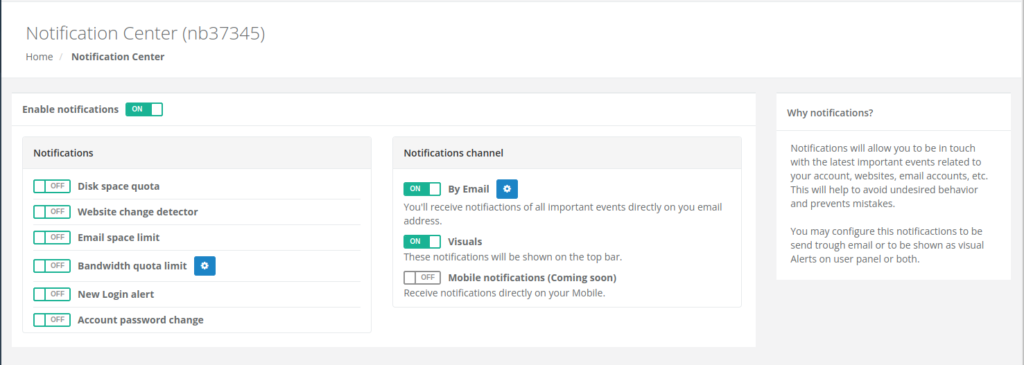
The Notification Center in the CWP User Panel allows users to receive alerts about significant events and changes related to their accounts, websites, and email accounts. Users can customize which notifications they receive and through which channels, ensuring they stay informed in a manner that suits their needs.
Accessing the Notification Center

To access the Notification Center in the CWP User Panel, follow these steps:

  1. Log into your CWP User Panel using your username and password.
  2. Navigate to the CWP Settings section from the left-hand menu.
  3. Click on Notifications to open the Notification Center.

Configuring Notification Settings

Users can customize their notification preferences to ensure they receive relevant alerts. Here are the steps to configure your notification settings:
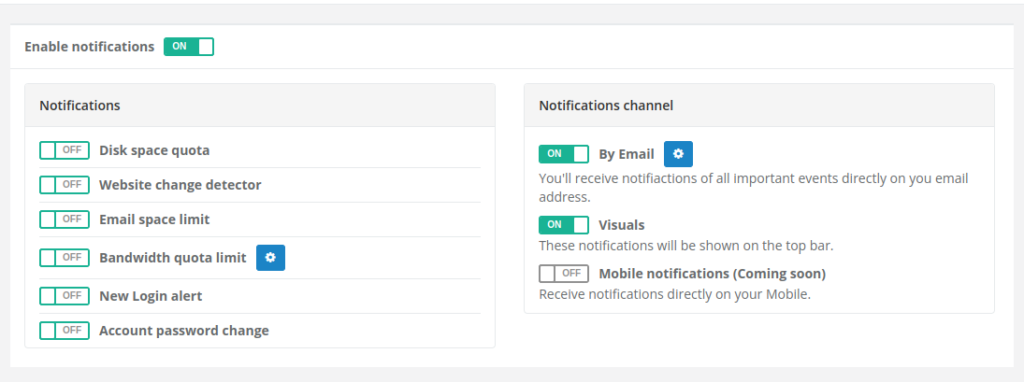
  • Activate the desired notifications by toggling the switch from OFF to ON.
  • Select the preferred notification channel:
    • By Email: Receive notifications directly to your email address.
      • Click the Gear icon to configure email notifications.
      • Click Save to save your configuration.
    • Visuals: Notifications will appear on the top bar of the CWP User Panel.
    • Mobile Notifications: Receive notifications directly on your mobile device.

Types of Notifications

The Notification Center provides several types of notifications to keep users informed:

Disk Space Quota

Receive a notification when your disk space quota has run out. This helps prevent issues related to insufficient storage.

Web Change Detector

Notifies you when there is a change in the index.php or index.html files in the root directory, which can help detect possible attacks that modify these files.

Email Space Limit

Receive a notification when the space assigned to an email account has been exceeded, ensuring that important emails are not missed due to space limitations.

Bandwidth Quota Limit

Notifies you when the maximum bandwidth consumption has been reached, helping to manage and plan for bandwidth usage.

New Login Alert

You will be notified by email when a new login is made in the user panel, providing an extra layer of security by alerting you to unauthorized access.

Account Password Change

Receive a notification when your account password has been changed, ensuring you are aware of any changes to your account security.

Troubleshooting Notification Issues

Common issues users might encounter with the Notification Center include not receiving notifications or receiving too many irrelevant alerts. Here are some troubleshooting tips:

  • Ensure notification settings are properly configured to receive relevant alerts.
  • Check your email settings to ensure notifications are not being filtered to spam or junk folders.

Conclusion

The Notification Center in the CWP User Panel is an essential tool for managing your web hosting environment. By configuring and managing notifications effectively, users can stay informed about critical updates and security alerts, ensuring their websites and accounts remain secure and operational.

Check out our Control Web Panel Education channel for more articles and tutorials!

Scalable VPS Infrastructure, Fully Managed

When shared hosting can't handle your traffic, VPS delivers dedicated resources that scale with demand. Our team manages the technical complexity while you manage your business.

check markNVMe Storage    check markHigh-Availability    check markIronclad Security    check markPremium Support

VPS Hosting

Share this Article
Derrell Willis
Derrell Willis Manager, Developer Relations

More Articles by Derrell
Related Articles
Notification Center in CWP User Panel
Mod Security Configuration in CWP User Panel
Domains and Subdomains in Control Web Panel (CWP)
DNS Records in Control Web Panel (CWP)
Control Web Panel (CWP) FTP Accounts

Post navigation

Mod Security Configuration in CWP User Panel
How to Create Packages in Control Web Panel (CWP)
Latest Support Articles
  • How to Fix cURL Error 60 in WordPress: SSL Certificate Problem
  • Managing Email During a Website Transfer to InMotion Hosting
  • How to Tell If a Website Is Secure: 2026 Browser Guide
  • InMotion Care FAQs
  • How to Install and Configure Redis on Your Linux VPS or Dedicated Server
  • How to Fix the PHP-FPM “server reached max_children” Error
  • How to Enable SSH (Shell Access) Through WHM
  • How to Generate SSH Keys and Set Up SSH Key Authentication
  • What Are Meta Tags? Guide to SEO Meta Tags & Best Practices
  • How to Set Up a 301 Permanent Redirect via .htaccess & cPanel
  • Install Let’s Encrypt Free SSL Certificate on Ubuntu with Certbot
  • How to Set Up MariaDB on a VPS: Installation and Initial Configuration
  • How to Use IPMI in AMP (Dedicated Servers)
Control Panels
  • Account Management Panel
  • cPanel
  • Control Web Panel
  • CyberPanel
  • InMotion Central
  • Softaculous
  • WebHost Manager (WHM)
  • WebPro
Popular Tutorials
  • Backups and Restorations
  • Databases
  • DNS and Nameserver Changes
  • eCommerce
  • Email Basics
  • Git
  • Google Tools
  • Hosting Product Guides
  • NGINX
  • Secure Socket Layer (SSL)
  • Security
  • SSH and Root Access
  • Website Error Numbers
  • WordPress
  • WooCommerce

Need More Help?

Search our Help Articles
Current Customers

Chat: Chat with Sales
Call: 757-416-6575 x2
Ticket: Submit a Support Ticket

Get Reliable Web Hosting

Chat: Chat with Sales
Email: [email protected]
Call: 757-416-6575 x1

Get web hosting that grows with your business. Our all-in-one hosting platform gives you everything your website needs to scale - so you can focus on the next big thing for you and your business.

InMotion Hosting Logo

InMotionHosting.com provides web hosting, cloud-based solutions and managed services to businesses and entrepreneurs across the globe.

Follow Us

Web Hosting
  • Shared Hosting
  • Hosting for WordPress
  • Managed Hosting for WordPress
  • UltraStack ONE for WordPress
  • VPS Hosting
  • Cloud VPS
  • Dedicated Server Hosting
  • Bare Metal Servers
  • Enterprise Hosting Solutions
  • OpenMetal Cloud IaaS
  • Reseller Hosting
  • Reseller VPS
  • Minecraft Server Hosting
  • eCommerce Hosting
  • RamNode Cloud
  • InMotion Cloud
  • Pricing
Hosting Tools
  • WordPress
  • WooCommerce Hosting
  • Drupal Hosting
  • Joomla Hosting
  • cPanel Hosting
  • PHP Hosting
  • Magento Hosting
  • PrestaShop Hosting
  • Laravel Hosting
  • Ubuntu Hosting
  • Linux Hosting
  • WebPro Dashboard
  • WordPress Website Builder
  • Domain Names
  • Professional Email
Support
  • Live Chat
  • +1 757 416 6575
  • +44 2045 763722
  • Support Center
  • Resources
  • Community Support
  • WordPress Tutorials
  • RamNode Deployment Guide
  • InMotion Solutions
  • Managed Hosting
  • Website Migrations
  • Data Center Locations
  • Los Angeles Data Center
  • Ashburn Data Center
  • Amsterdam Data Center
About Us
  • Contact Us
  • About Us
  • Blog
  • News
  • Careers
  • Affiliate Program
  • Refer a Friend
  • Student Web Hosting
  • Sitemap
  • Cookies Settings
  • Accessibility (ADA) Settings

Copyright © 2002-2026 InMotion Hosting, Inc. All Rights Reserved. InMotion Hosting® is a registered trademark of InMotion Hosting, Inc.

Terms of Service | Privacy Policy | DPA | Accessibility Statement | Legal Inquiries
Do Not Sell My Personal Information | Limit Use of My Sensitive Personal Information

By continuing to visit any webpage within this website, each visitor agrees to the use of cookies and tracking technologies, and further agrees to abide by our Universal Terms of Service, Privacy Policy, Cookie Policy, and any other terms and policies posted on this website.