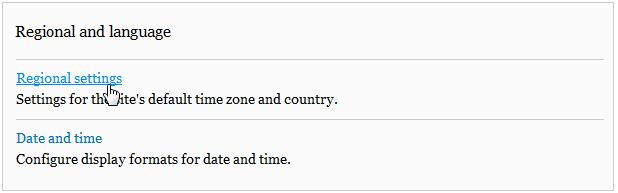
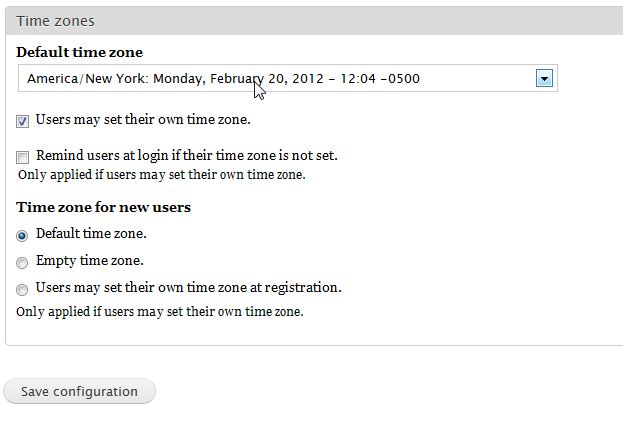
Changing the Time Zone in Drupal 7 Carrie SmahaUpdated on August 16, 2021 1 Minute Read You can change the time zone for your Drupal 7 website at any time. You can even allow users of your website to set their own time zones as well. This allows the dates on pages, articles, posts, etc. to display in a timeframe that is meaningful to the viewer. Changing the time zone for Drupal is accomplished through the administrator dashboard. To change the Time Zone in Drupal 7: Log into your Drupal 7 dashboard Go to Configuration Go to the Regional and language category and click on Regional settings Under the Time Zones heading select the Default time zone from the drop down menu Click Save configuration If you need further assistance please feel free to ask a question on our support center. Share this Article Carrie Smaha Senior Manager Marketing Operations Carrie Smaha is a digital strategy, web development, and SEO leader with 20 years of experience. She built her foundation in fast-paced agency environments before moving in-house to InMotion Hosting, where she leads go-to-market programs, agency initiatives, and technical product marketing that connects product capability to real customer decisions. More Articles by Carrie Related Articles Getting Started Guide: Drupal How to Use the Simple XML Sitemap Drupal Module Finding 404 page not found errors in Drupal 7 Removing the site title in Drupal 8 Content Types in Drupal 8 Disabling user images for posts and comments in Drupal 8 How to add an image in Drupal 7 How to upload your custom logo in your Drupal 7 theme Setting custom logos in your Drupal 8 theme Fixing the “An unrecoverable error occurred” error in Drupal