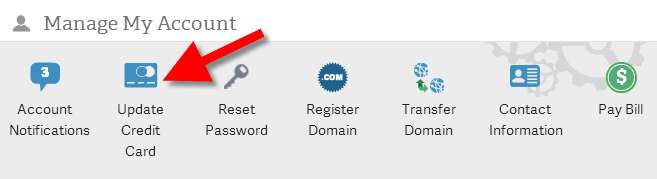
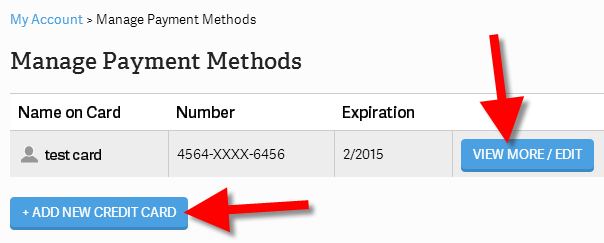
How to Add or Change a Credit Card in AMP Updated on November 19, 2021 by InMotion Hosting Contributor 0 Minutes, 44 Seconds to Read You can add or update a credit card on file for your account within your Account Management Panel (AMP). Any time you want to change your credit card settings you can do so within AMP without having to contact InMotion Hosting Support. Adding/Changing your Credit Card in AMP Log into your Account Management Panel In the Manage My Account menu, click the Update Credit Card button. You will then be on the Manage Payment Methods page. Click the View More/Edit button to view or update an existing card, or click the Add New Credit Card button to add a new card. Updates to your Credit Card on file will take place immediately. Now, you can easily renew or pay for your current plan in the Account Management Panel. If you find you need further assistance please feel free to ask a question on our support center website. Share this Article IC InMotion Hosting Contributor Content Writer InMotion Hosting contributors are highly knowledgeable individuals who create relevant content on new trends and troubleshooting techniques to help you achieve your online goals! More Articles by InMotion Hosting Related Articles Submitting a Ticket Request How to Add/Cancel Domain Privacy in AMP How to Upgrade / Downgrade Your Hosting Plan in AMP How to Purchase or Cancel an SSL From AMP Manage Your Control Web Panel Server from the Account Management Panel (AMP) Advanced Product Support (APS) Explained Engrampa Archive Manager for Linux How to Change Your Domain Nameservers in AMP Adding a Dedicated IP Address to Your Server How To Get Great Support & Customer Service