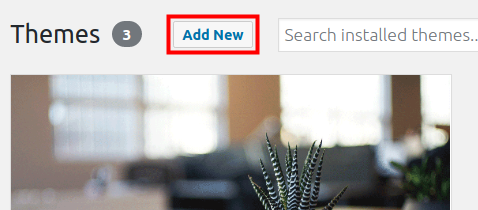
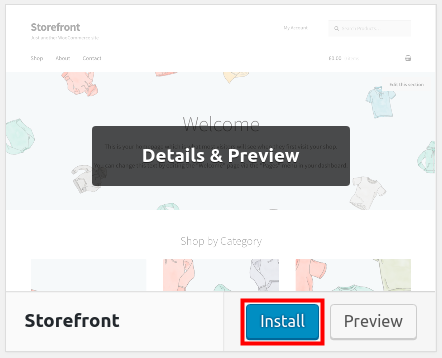
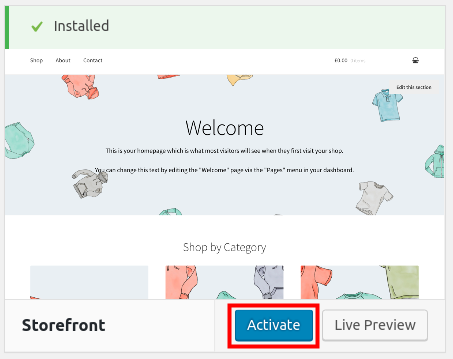
How to Install the Storefront Theme in WordPress Updated on February 2, 2021 by InMotion Hosting Contributor 0 Minutes, 51 Seconds to Read In this first tutorial of the Storefront series, we will show you how to install the Storefront theme in WordPress. This theme was designed to work seamlessly with the WooCommerce plugin and allows you to easily build an eCommerce store. Since the Storefront theme and WooCommerce plugin were created by the same developers, it ensures they are compatible and will work well together. Install Storefront Theme in WordPress Note: Since this theme was designed to work with WooCommerce, you should install WooCommerce before completing this guide. Log into your WordPress Dashboard. Click Appearance then Themes in the navigation menu. Click the Add New button on the Themes page. Type ‘storefront‘ in the search field. You will see the Storefront theme by automattic. Click the Install button. After the Storefront theme has been installed click the Activate button to enable it. Congratulations, now you know how to install the Storefront theme in WordPress! In the next guide we will show you how to create a homepage with the Storefront theme. Learn more about the power of WordPress Themes and how they can simplify your website building and maintenance. Share this Article IC InMotion Hosting Contributor Content Writer InMotion Hosting contributors are highly knowledgeable individuals who create relevant content on new trends and troubleshooting techniques to help you achieve your online goals! More Articles by InMotion Hosting Related Articles An Introduction to Kadence – A Lightweight but Powerful WordPress Theme How to Install a WordPress Theme Astra: The Lightweight and Customizable WordPress Theme Quickly Create a Website with the OceanWP WordPress Theme Which WordPress Themes are Best for Reseller Accounts? Which WordPress Themes Are Best For VPS Accounts? The Best WordPress Themes for Small Businesses What is a WordPress Child Theme? Insert Code into your WordPress Theme Unobtrusive Design Studio WordPress theme by Template Monster