
In this tutorial, we will show you how to add credit to your eNomCentral account.
Learn more about the Reseller Hosting solutions from InMotion for your hosting business.
Adding Credit
- Log into the eNomCentral.
- Click the Refill Account next to your Account Balance.
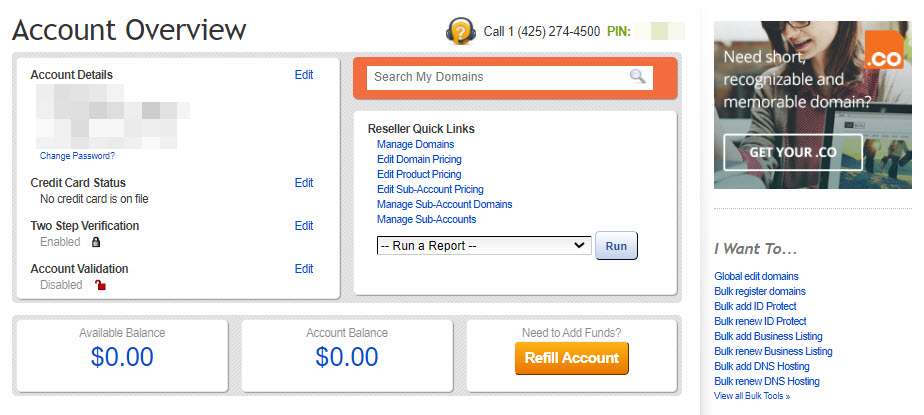
- Select the method you will use to add funds to your account. Fill in the billing information for your payment, then enter the amount you want to add in the available field. It must be between $25-$3000.
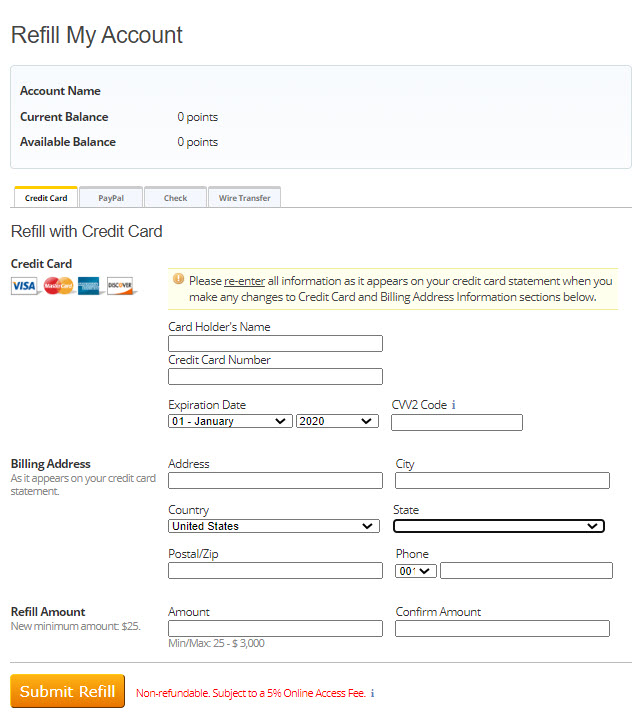
- Click the Submit Refill button.
- You will then see a message stating that you will be charged your chosen amount. Click the OK button to confirm that you will add the credits to your account.
Select the method you will use to add funds to your account. Fill in the billing information for your payment, then enter the amount you want to add in the available field. It must be between $25-$3000.
Congratulations, now you know how to add funds to your eNomCentral account! Learn more about reseller hosting by going to the Reseller Product Guide.