
Core dumps are files the system creates when a process running in memory does not finish. The portion of memory that the process was using is then dumped to a file. This can be quite helpful when debugging your scripts. Core dumps typically have a file name like: core.5876
Reviewing Core Dump Files on VPS or Dedicated Servers
For most users, getting usable information from a core dump file can be difficult. If you are a VPS or Dedicated customer with command line (shell) access, most of the information in the core dump can be found by running either one of these two commands:
gdb -c core.####
strings core.####
Reviewing Core Dump Files on Shared Servers
If you are on a shared hosting package, for security reasons you do not have access to the command line. For our shared customers, we’ve created a basic PHP script that uses the commands above to allow you to find any core dump files in your account. The script can be found here:
https://www.inmotionhosting.com/support/files/scripts/coredumpcheck.txt
Please note! For security reasons, please either delete this file after using it OR password protect it.
- Upload the coredumpcheck.txt file to the folder where you want to view core dumps.
- Rename the file to coredumpcheck.php
- Access coredumpcheck.php file in your browser. For example, if you have core dumps in your public_html folder then you would go to https://example.com/coredumpcheck.php
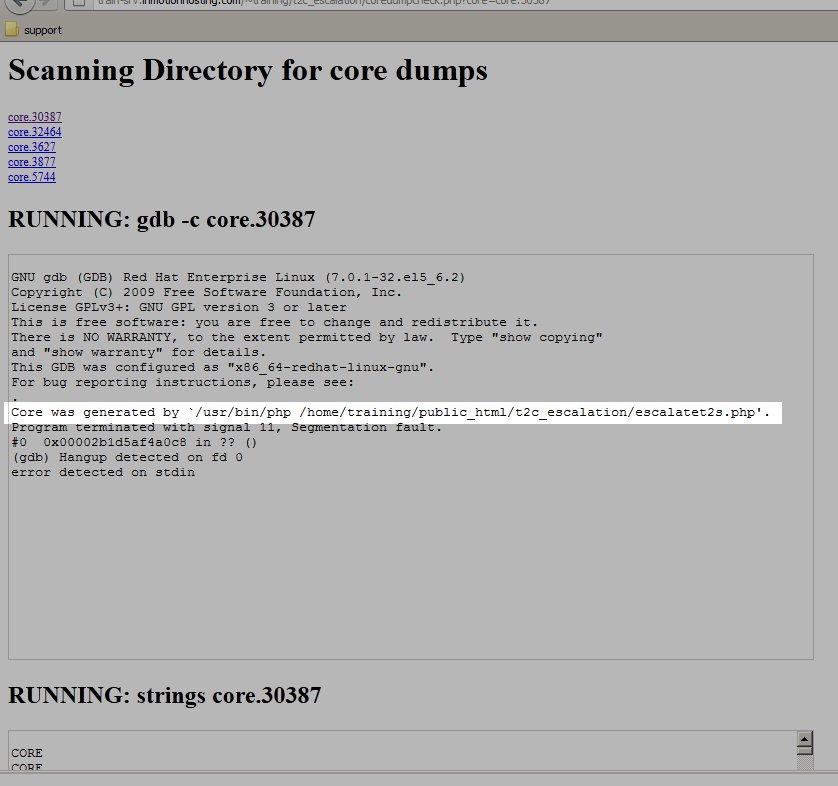
- The script will list all the core dumps in the current directory. Click any of the file names to view more details about the core dump.Â
- Look under the “RUNNING: gdb -c core.30387” heading to find the script that is causing the problem. It will look something like:
Core was generated by ‘/usr/bin/php /home/training/public_html/t2c_escalation/escalatet2s.php’.
We’ve highlighted this in the screenshot below:

Resolving Core Dumps
Core dumps are advanced in nature. It’s best practice to contact your web developer with the information that you have using the coredumpcheck.php script. If you are using a CMS such as WordPress, Joomla, or Drupal and the core dump is being caused by a plugin or module, your can disable or remove that module to resolve the issue.