
Occasionally our technical support is asked how to direct your website visitor’s to view your website over HTTPS. Let’s look an example:
If a visitor goes to your website using https://mydomain.com, you can force them so they will always use the shared SSL certificate. Shared SSL’s are included on all Shared Hosting plans. If you’re not familiar with SSL certificates, please view our article. If you have a dedicated SSL and want to force all of your website traffic to use your dedicated SSL we have a great tutorial on that as well.
Forcing your visitors to use the Shared SSL
To force your visitors to use the shared SSL certificate that InMotion Hosting provides:
- Log into cPanel
- Go to the “Redirects” section
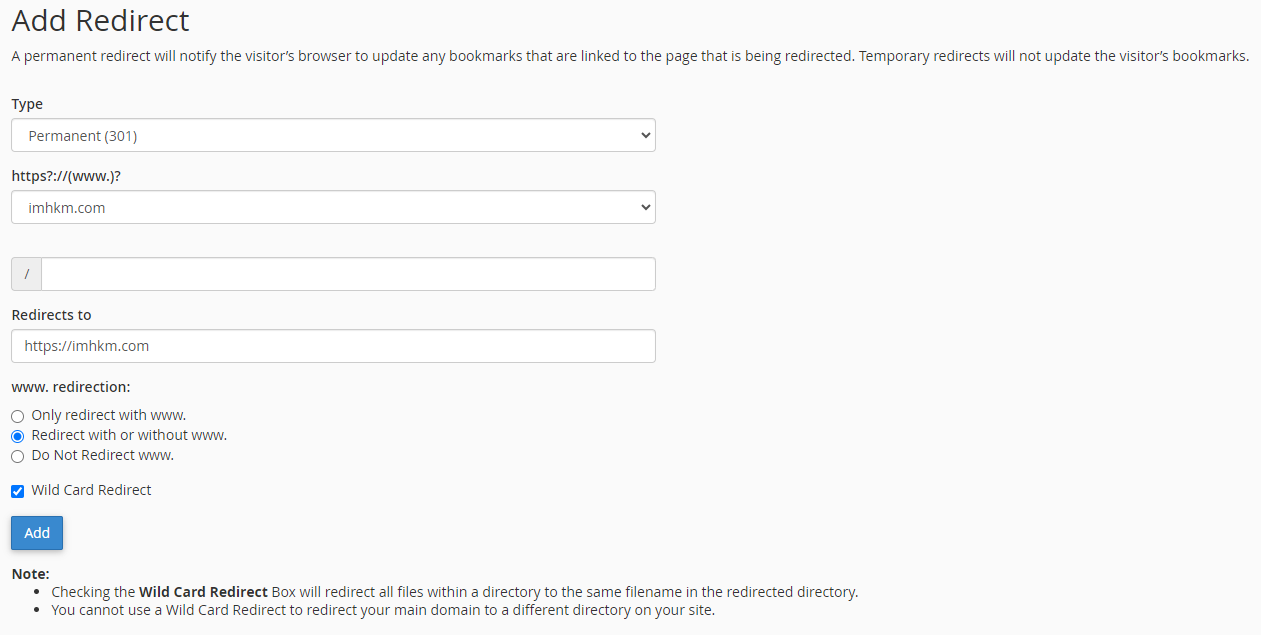
- Set the “type” to “Permanent (301)”
- Next to “https://(www.)” choose the domain name you want to do this for
- Enter your websites URL using the Shared SSL next to the “redirects to” field
- We recommend using the “Redirect with or without WWW” selected so that any visitor will be forced to use the SSL whether they use mydomain.com or www.mydomain.com
- Ensure “Wild Card Redirect” is checked
- Click “Add”
During this example, we used the imhkm.com domain and redirected it to https://imhkm.com
If you need further assistance please feel free to ask a question on our support center website.