In this tutorial:
Who is affected? What Causes the Insecure SSL Warning? How to Fix the Insecure SSL Warning

The most recent versions of Google Chrome will show a severe warning for certificates encoded in SHA-1 that are set to expire after January 1, 2017. In this article, we will discuss why this error occurs, and how to avoid and correct it.
Who is affected by the Insecure SSL error?
Since SSL certificates are issued yearly by InMotion Hosting, this will not apply to most of our SSL ccertificates. There are 2 criteria you have to meet, in order for your site to show up as Insecure in Google Chrome.
- Your SSL certificate expires after January 1st, 2017.
- Your SSL was created using SHA-1 hashing. You can test your SSL by navigating here, (be sure to replace example.com with your actual domain name):
https://www.sslshopper.com/ssl-checker.html#hostname=example.com
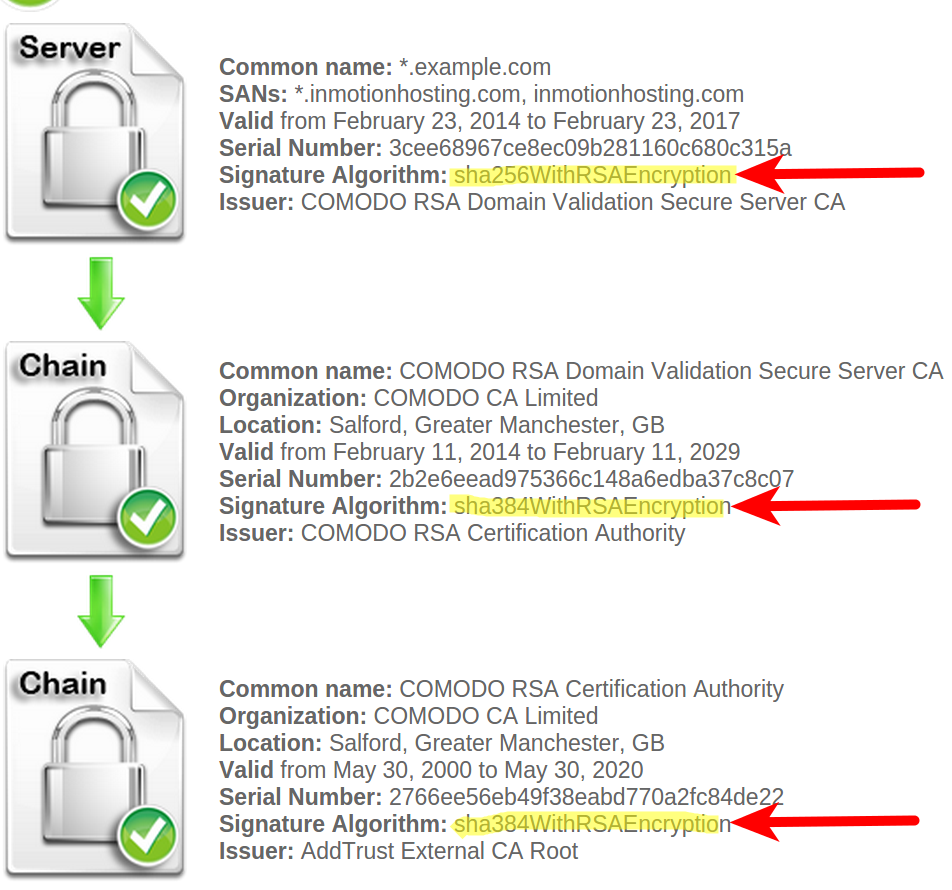
If your Signature Algorithm is lower than “sha256” you must fix your SSL. In the example below, the Signature Algorithm is “sha384,” so there is no need to fix it:

What Causes the Insecure SSL error?
While SSL certificates are currently secure, Google considers the SHA-1 hash algorithm insecure after 2016. This is due to reports from some security companies, that online attackers could feasibly compromise SSL certificates keyed with SHA-1 hash. Due to this, Google Chrome has started to flag these SSL certificates as insecure (see the screenshot at top of this article).
How to Fix the Insecure SSL Error
If your SSL certificate expires after 2016, and was created using SHA-1 hashing it will need to be rekeyed.
- Request a CSR via AMP
- Have your SSL provider rekey your SSL with the new CSR