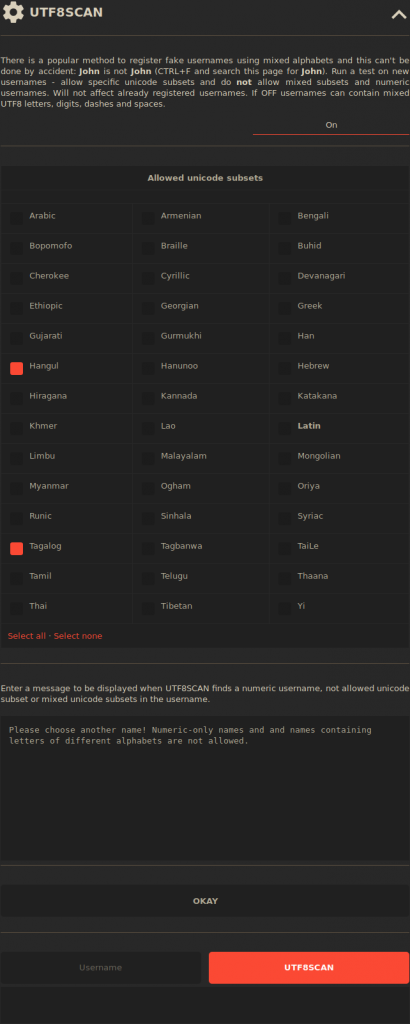
How to Disable Mixed Unicode Subsets in BlaB! AX Updated on December 4, 2023 by InMotion Hosting Contributor 0 Minutes, 39 Seconds to Read In this article, we cover how to disable unicode subsets and scan usernames to improve BlaB! AX security. This affects registrations and guests (if enabled). Disable Subsets UTF8Scans Do more securely with InMotion Hosting Shared Hosting. Disable Subsets Log in to BlaB! AX as an administrator. Click the triple-dot icon in the upper-left corner to view user options. Click the “A” admin button. On the left, click Settings. Click UTF8SCAN. At the top, click Off and select On. Deselect unicode subsets to disallow. Edit the error message below. Click OKAY. UTF8 Scan Copy a username from the users list to the username field at the bottom. Click UTF8SCAN for results. In this example, only Hangul (South Korea) and Tagalog (Philippines) are allowed. Learn more about BlaB! AX Group Chat System. Share this Article InMotion Hosting Contributor Content Writer InMotion Hosting contributors are highly knowledgeable individuals who create relevant content on new trends and troubleshooting techniques to help you achieve your online goals! More Articles by InMotion Hosting Related Articles Intro to Migrating your WordPress Site Data Migrating your WordPress Database Migrating WordPress Files Configuring WordPress After a Migration Testing your WordPress website after Migration How to Move WordPress from a Subfolder to the Root Directory What to expect during a mass server migration Move Your WordPress Site to a New Server Moving Websites Built with Older Technology into WordPress How to Export Your WordPress Sites