A WordPress Page is a webpage that will show up in your menu bar for your website visitors to access. If you have a business website you may have pages for about us, contact us, or location. Pages are always available in your menu bar and are not stored like posts in chronological order. They will not disappear from a page like posts do either. For more clarification see our full article WordPress Pages vs. Posts.
Creating a WordPress Page
- Login to your WordPress
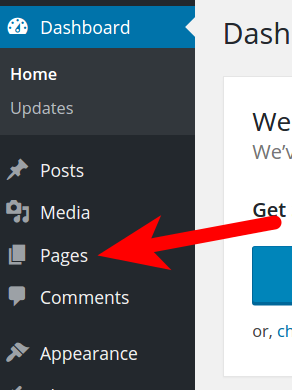
- Click Pages in the navigation menu.
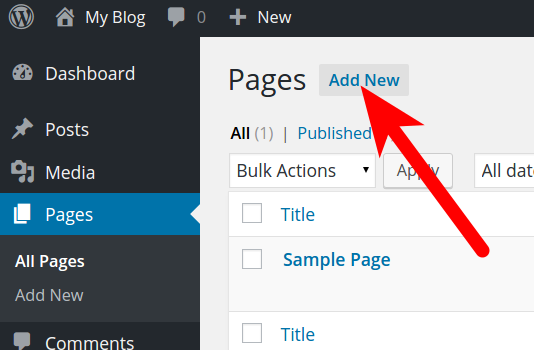
- You will then see any existing Pages. Click the Add New button.
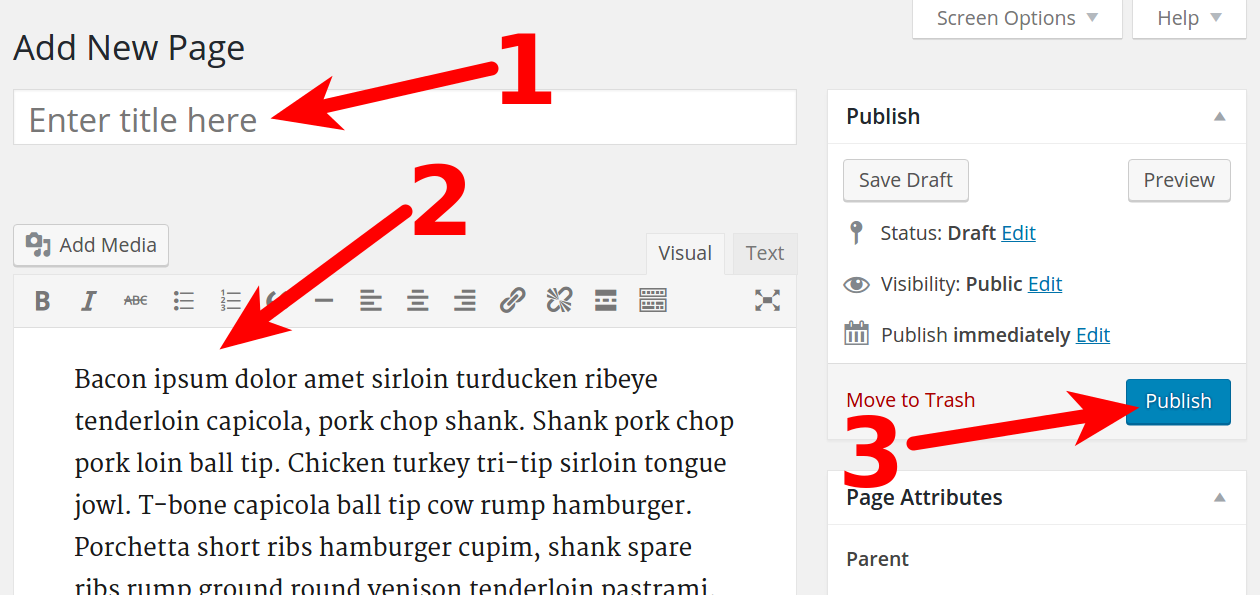
- You will then be on the Add New Page section. Fill in a Title in the top field, then fill in the body of the page. You can use the built-in tools for formatting. There is also an Add Media button you can use to add audio, or images. If you want to add HTML to the page, see our full guide on Adding HTML to a WordPress Page/Post


. Click the Publish button to save your Page publicly.
Once the site is published, if you visit the website you will notice that the new page is now listed in the menu bar. You can create as many pages you your website needs, there is no limit to the number of pages your WordPress website can have.
Congratulations, now you know how to create Pages in your WordPress site. We also have a full guide on how to create a Post in WordPress.
Build a WordPress site fast with a hosting plan that includes a visual drag-and-drop website builder, free domain, and hundreds of design templates.
 Free Templates Fast & Easy Transfers Free SSL Endless Customization Affordable
