When a visitor to your site receives an error message, such as 404 (Not found), or 500 (Internal server error); they will see the default error page. You can easily customize these pages in your cPanel with the Error Pages button. For example, you may want to personalize the error message. In this tutorial, we will show you how to create a custom error page in cPanel. Then, we will show you how to add a .htaccess rule, so your custom error pages will load when needed.

Creating a Custom Error Page
- Login to your cPanel.
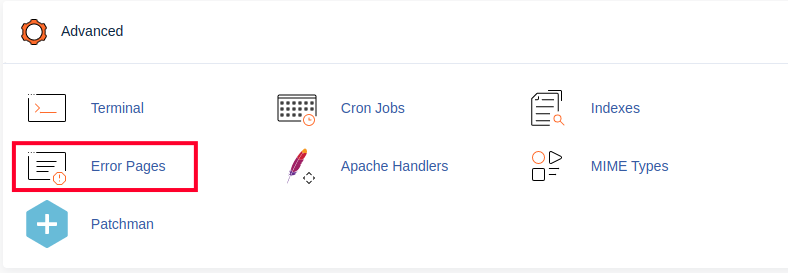
- Click the Error Pages button, in the Advanced section of cPanel.
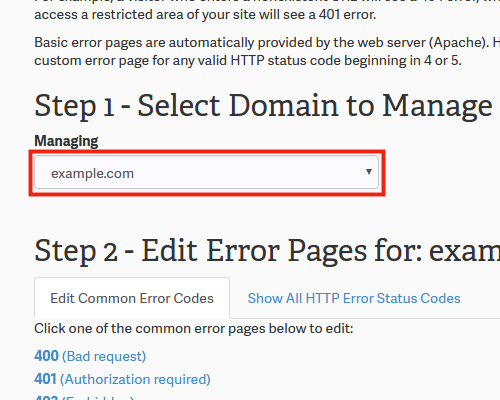
- If you have multiple domains in your cPanel, select it from the Managing menu.
- You will see a list of Common Error Codes, click the one you want to create a custom error page for. The available choices are: 400 (Bad request), 401 (Authorization required), 403 (Forbidden), 404 (Not found), and 500 (Internal server error). To edit additional error codes, click the Show All HTTP Error Status Codes tab. In my tests, I am selecting 404 (Not found)
- You will then be on an editor page. You can enter HTML code here, or insert premade tags if you want. Below is a brief description of the available tags.
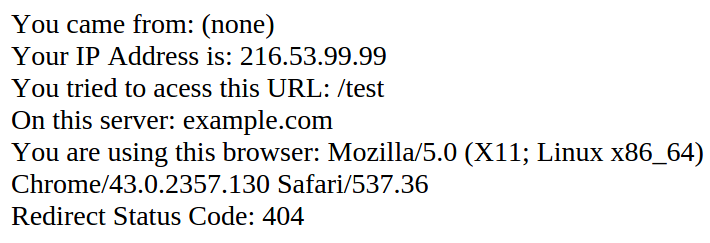
Tag Description Referring URL Lists the URL you came from. Visitor’s IP address Lists the IP address of your site visitor. Requested URL Shows the URL you are attempting to access Server Name Shows the name of the server. Visitor’s Browser Lists the visitor’s browser type. Redirect Status Code This will display the error message code, such as 500, or 404, etc. - Click the Save button at the bottom when you are finished.
Setup Your .htaccess File
- Edit the .htaccess file for your site, and add a rule for the errors you created. If you need help locating your .htaccess file, see our guide “Where is my .htaccess file?.” Below is an example of the file formatting:
ErrorDocument 400 /400.shtml
ErrorDocument 401 /401.shtml
ErrorDocument 403 /403.shtml
ErrorDocument 404 /404.shtml
ErrorDocument 500 /500.shtml - Save your .htaccess file. Now when someone triggers an error message on your site, it will display your Custom Error Page.
Congratulations, now you know how to create custom Error Pages in cPanel! For additional reading, here is a link to the official cPanel documentation on Error Pages.