Domain names are automatically renewed after registering them through us. However, you may find a time when you no longer need one and want to cancel it. You may be changing names or building a new site altogether. In this guide we will show you how to cancel a domain registration from your AMP.
Note: Domain names are often renewed up to 2 weeks prior to their expiration date and are NON-refundable. Be sure to cancel your domain name before the two week window to ensure it cancels properly.
Cancelling a Domain Registration
- Login to AMP.
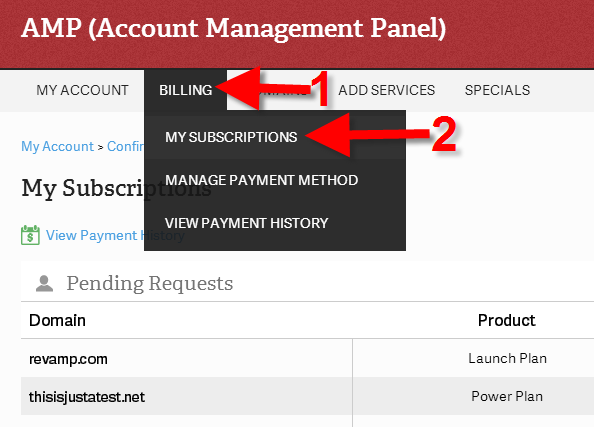
- In the main menu, move your mouse over the Billing option, and click My Subscriptions.
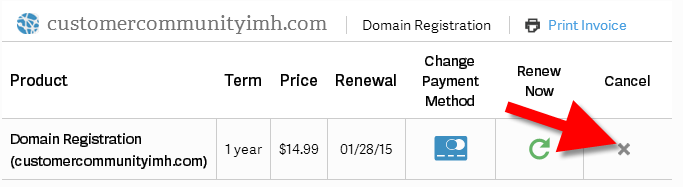
- Find your domain on the My Subscriptions page, and click the “X” to the right.
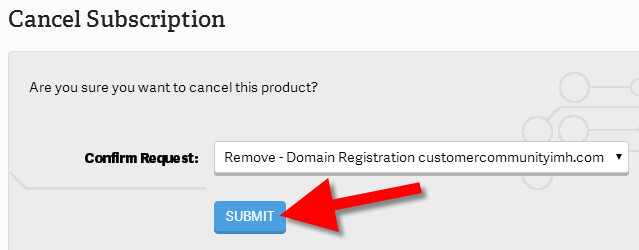
- Confirm you want to cancel your domain registration on the next screen by clicking the Submit button.
You will then see a message stating “You have cancelled your Domain Registration subscription.”



Congratulations, now you know how to cancel your domain registration from your AMP!
To learn how to cancel your hosting account please see How Do I Cancel My Hosting Account?