It’s essential to keep your billing and contact information up-to-date so your website will stay online. Most accounts will renew automatically before allowing them to expire. But, if your payment information is not correct we would not be able to renew any services that you have subscribed to.
When there are any billing issues, the first thing we would attempt to do is reach out to you using the contact information you have set up in your Account Management Panel (AMP). If this is not accurate, we will not be able to notify you of any discrepancies.
Follow along and we’ll show you how to update your billing and contact information in your AMP. For help logging into AMP, please read our article on How to Login to AMP.
Is your website growing faster than you planned? You can easily upgrade your Hosting plan in AMP at any time.
How to Change or Add a New Credit Card
- Login to AMP.
- On the top menu, roll your mouse over Billing and click the Manage Payment Method link.
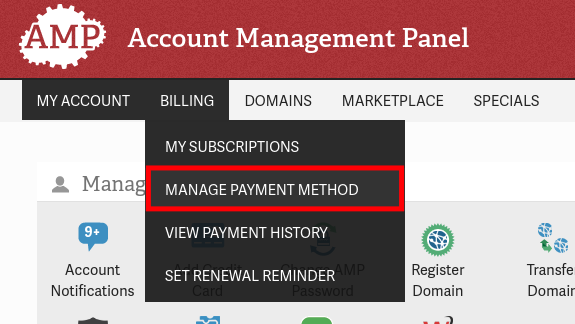
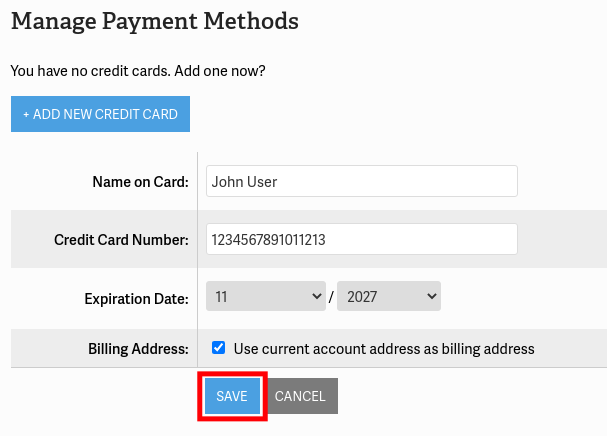
- Click the Add New Credit Card button to use a new card, or click the Edit button to update an existing one.
- Fill in the Credit card information as needed. Uncheck the box to use a different address from the billing address.
- Click the Save button.
How to Update Your Contact Information
- Login to AMP.
- In the top menu, roll your mouse over My Account then select the Contact Information option.
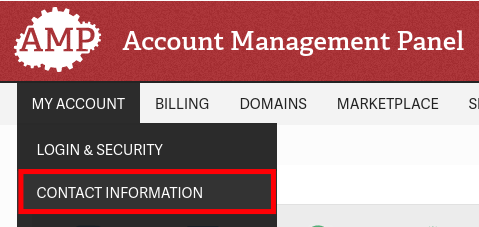
- You will see the contact information we have associated with your account. Click the Edit Contact Information button.

- Update your contact information as needed then click the Save Changes button on the bottom.
Now you know how to successfully update the billing and contact information for your account. Next time one of your hosting services renews it will utilize the new credit card. Renewal reminders and billing notifications will be sent to the email address listed in your AMP account.