Whenever you send an email, your email passes through several different servers before it reaches its destination. Along the way, some servers may add certain text to the headers of the email (email headers include data such as who the message is to/from). For example, your Internet Service Provider (such as Comcast or AT&T) may add to the headers the time they received the email from you. The final server accepting the email may scan to check if the email spam, and it may add a summary of this scan to the headers.
Multiple IP addresses are added to email headers
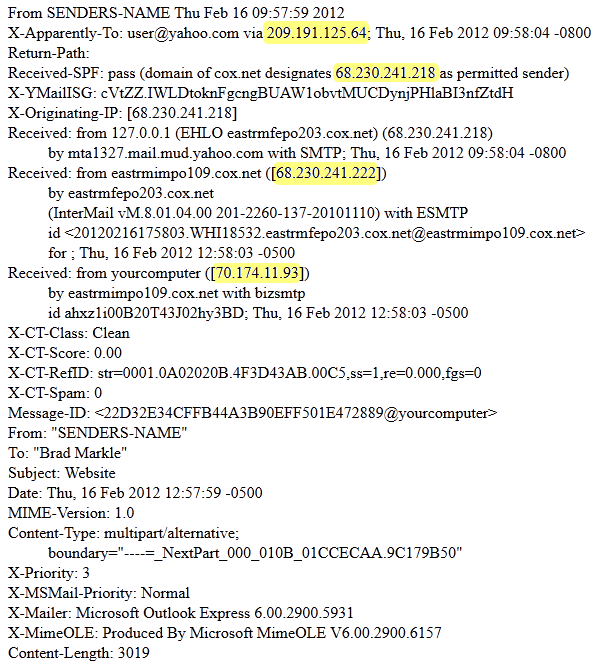
IP addresses are also added to your email’s headers. For example, your home/office ip address may be added to the email. The mail server at your ISP that initially accepts your email may add their IP address, and the final server accepting the message may log their IP address as well.
Emails can be labeled as spam based on IP addresses
There are many anti-spam techniques used on the web to filter out spam. One of those techniques includes blocking email from IP addresses that may be suspected of sending spam. If you have an email marked as SPAM based upon the IP address, the IP address could be that of:
- Your home/office
- A server belonging to your ISP
- A server belonging to InMotion Hosting
When troubleshooting why an email has been blocked as spam, if the block was because of an IP address, you’ll want to contact the provider in charge of that IP address. For example, if your home/office IP address is the one labeled as a possible source of spam, then you will want to contact your ISP and provide them with the delivery failure message (which states the IP address blocked). If it is an InMotion Hosting server, you’ll want to contact InMotion Hosting.