You’re a website creator now. You are building a valuable and sustainable website that may be read and linked back to for many years.
How did this happen?
It’s not as complicated as you might think. It’s about all treating each page of your site as a well-organized document. And the best way to do that is to remember your SEO markup hierarchy.
This will require a little HTML work, but not much.
Strategic Use of Heading Tags
In basic HTML training you may have learned that each tag has a functional purpose. This means that <p> tags are for paragraphs and <h1> tags for “Heading 1” elements.
Remember that search engines read your pages the way a robot would: without much regard for style and aesthetics. In effect, the robots are looking to see how your information is organized.
And if the information on your page is organized in a coherent way, the search engine is more likely to recommend you higher in search results pages.
This means your document must be organized according to a hierarchy. Take a look at these headings for an example Bike Shop website:
<h1> - Joe's Bike Shop       (Parent)
  <h2> - We're Having a Sale (Child)
    <h3> - Item 1 on sale    (Grandchild)
    <h3> - Item 2 on sale    (Grandchild)
  <h2> - How to Use Coupons  (Child)
    <h3> - Email             (Grandchild)
    <h3> - Redeem in store   (Grandchild)
Notice how the headings on this example page are organized like an outline you might have written in school.
The same way an outline can be used to help you write an essay in school, an outline strategy can also be used to organize page content in a hierarchy of significance.
No Code Required (How to Do It In WordPress)
But you may be wondering: I don’t want to use HTML code, how can I do this in the BoldGrid Post and Page Builder?
It’s easy.
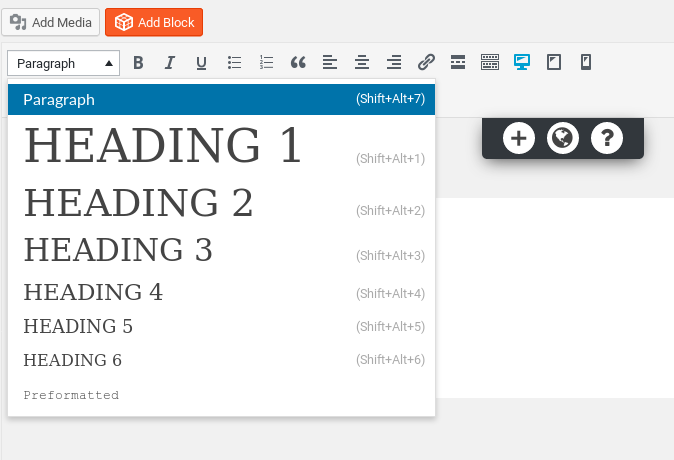
While working in a text field, select the Styles dropdown menu. Here you can select all kinds of page elements and their correct HTML code will be applied behind the scenes.
This way you can maximize your SEO potential the fast easy way.
If you have any questions or comments please leave them below and we’ll happy to help out.