
If you are a system administrator (sysadmin) for an InMotion VPS Hosting account then you can manage accounts on your server using the List Accounts feature in WebHost Manager (WHM). As a sysadmin, this option gives you a quick overview of cPanel accounts to get to information like administrator emails, password changes, IP addresses, disk space used, cPanel access, and quota settings. Follow the directions below to get to the list accounts option so that you can more effectively use WHM to manage your VPS account.
 Enjoy high-performance, lightning-fast servers with increased security and maximum up-time with our Secure VPS Hosting!
 Linux VPS cPanel or Control Web Panel Scalable Website Migration Assistance
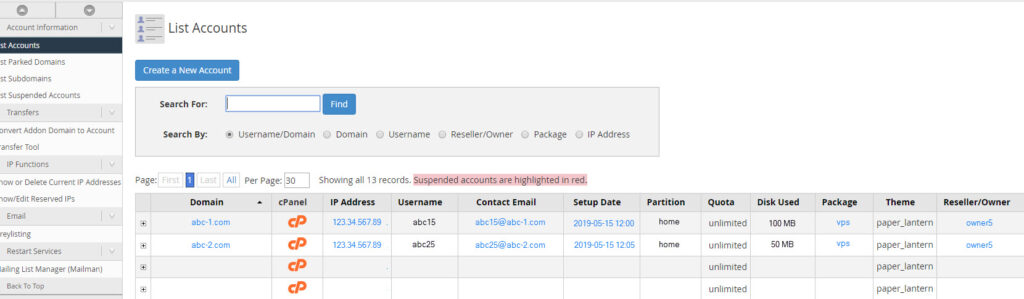
List Accounts Screen in WHM
- Log into the WHM.
- In the top left corner, click on the search field and type, “List Accounts.”
- This will bring you to the Account Information section and highlight List Accounts. Click on List Accounts.
- You will then see the List Accounts screen showing the accounts that have been created within your VPS.
Congratulations! You now know how to access the List Accounts screen in WHM. You can use this option in WHM to quickly manage or acquire critical information for your VPS accounts.
Learn more from our Managed VPS Hosting Product Guide.