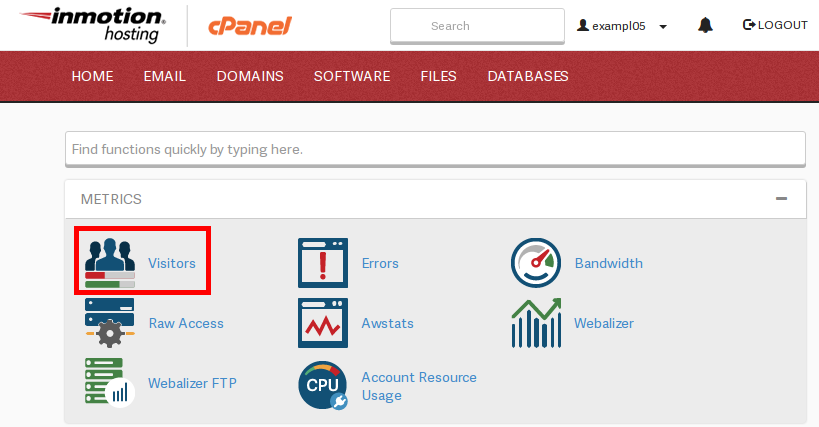
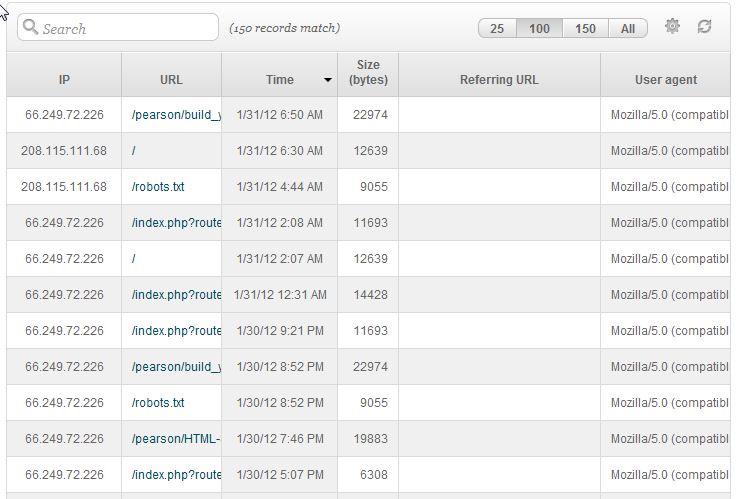
Finding out the latest visitors to your website in cPanel Carrie SmahaUpdated on August 16, 2021 1 Minute Read You can see the server logs for the latest visitors to your website in cPanel. This information is routinely rotated by gives you a quick snapshot of the traffic to your website. You can look at the “latest visitors” by logging into cPanel. Log into cPanel Go to the section called “METRICS” and click on “Visitors” Select the domain or subdomain you wish to view the stats for. You can now see the data for that domain If you need further assistance please feel free to ask a question on our support center. Summarize and Research with AIShare on Social Media Carrie Smaha Senior Manager Marketing Operations Carrie Smaha is a digital strategy, web development, and SEO leader with 20 years of experience. She built her foundation in fast-paced agency environments before moving in-house to InMotion Hosting, where she leads go-to-market programs, agency initiatives, and technical product marketing that connects product capability to real customer decisions. More Articles by Carrie Related Articles How to Fix Zone Editor Errors in cPanel and WHM Reset DNS for Domain to cPanel Defaults Using the Zone Editor in cPanel How to Install the cPanel Cache Manager How to Manage AutoSSL Certificates in cPanel How to Migrate Your Website Using cPanel How to Setup an Email Forwarder in cPanel & Webmail How to Create an Email Account in cPanel An Introduction to Branding cPanel for Your Users How to Modify MX Records Using cPanel