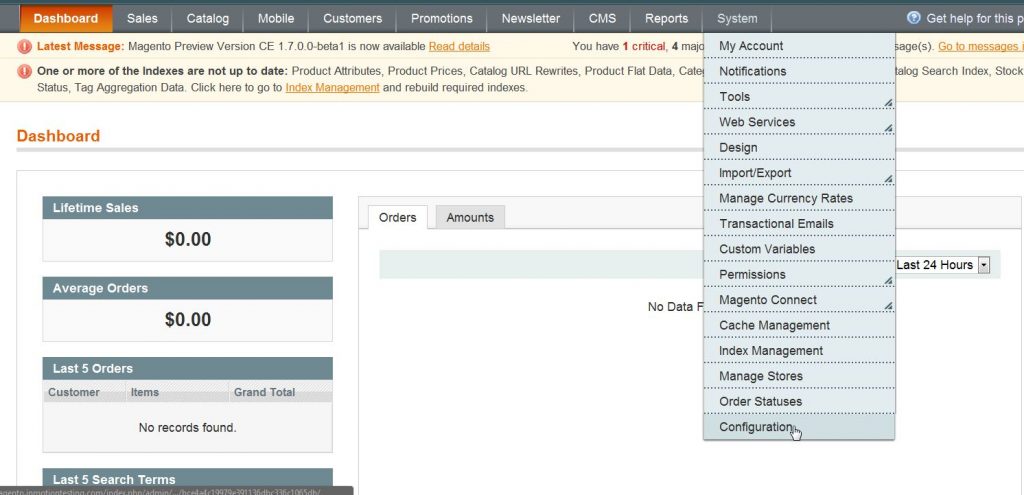
How to Display Products that are Out of Stock in Magento Carrie SmahaUpdated on September 14, 2023 1 Minute Read By default, your hosted Magento website will not display products that you do not have inventory for. If a product has no inventory your website’s visitors will not see it. This can be problematic since you may want to pre-sell products before their release date or have the ability to back-order stock on your website. This setting to allow Magento 1.6 to display and sell products that are out of stock can be changed in your Magento Admin Backend. Log into your Magento Admin Panel. Go to System ->> Configuration. Click on Inventory in the left side menu pane. Open the Stock Options section. Change the Display Out of Stock Products to Yes. Click Save Config. Please feel free to visit our other Magento Tutorials in our Education Channel. Discover the ultimate in Magento Hosting. Elevate your eCommerce site's performance, scalability, and speed for an exceptional user experience. Share this Article Carrie Smaha Senior Manager Marketing Operations Carrie Smaha is a digital strategy, web development, and SEO leader with 20 years of experience. She built her foundation in fast-paced agency environments before moving in-house to InMotion Hosting, where she leads go-to-market programs, agency initiatives, and technical product marketing that connects product capability to real customer decisions. More Articles by Carrie Related Articles 10 Magento Security Tips Changing the Magento 1.6 Login to Case Sensitive How to Allow Backorders in Magento 1.6 Changing the Year-To-Date Report Dashboard in Magento 1.6 Adding Store Email Addresses to Magento How to stop Displaying Product Reviews in Magento 1.6 How to Install Magento Manually Merging Javascript Files in Magento 1.6 How to Edit the Footer in Magento 1.6 Changing the Default Welcome Message in Magento 1.6