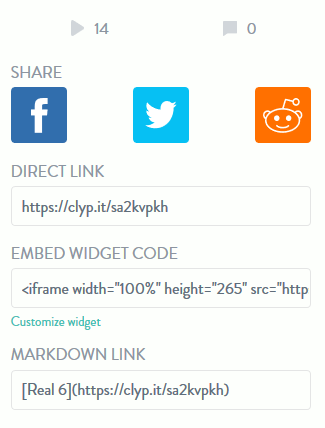
How to Embed Clyp.it Audio Updated on December 22, 2023 by InMotion Hosting Contributor 0 Minutes, 29 Seconds to Read Podcasters and musicians looking for an alternative to Soundcloud may prefer Clyp.it. Below we cover how to embed Clyp.it audio files, called “Clyps” into your content management system (CMS) or other website using HTML. Only public Clyps can be embedded Embed Clyp Go to the Clyp.it pageOn the right, copy the HTML code under Embed Widget CodeFor example: <iframe width=”100%” height=”265″ src=”https://clyp.it/sa2kvpkh/widget” frameborder=”0″></iframe>Paste the code in your HTML page or CMS (e.g. WordPress, Drupal 8, Joomla) text editorEdit the width and height as needed Share this Article InMotion Hosting Contributor Content Writer InMotion Hosting contributors are highly knowledgeable individuals who create relevant content on new trends and troubleshooting techniques to help you achieve your online goals! More Articles by InMotion Hosting Related Articles Troubleshooting SSL Connection Errors: How to Fix HTTPS Issues What Is SSL and Why Does It Matter for Your Website? How to Tell If a Website Is Secure: 2026 Browser Guide How to Enable cPanel AutoSSL via Account Management Panel (AMP) and WHM How to Manage AutoSSL Certificates in cPanel How to Run and Read a Traceroute: Troubleshooting Website Connectivity What Are Meta Tags? Guide to SEO Meta Tags & Best Practices Meta Descriptions and SEO Install Let’s Encrypt Free SSL Certificate on Ubuntu with Certbot How to Set Up a 301 Permanent Redirect via .htaccess & cPanel