


cPanel’s built-in webmail gives you browser-based access to any email account hosted on your InMotion server, no mail client setup required. This guide covers three ways to reach your inbox: directly through your domain URL, through the cPanel Email Accounts interface, and through the InMotion AMP Dashboard.
What Is cPanel Webmail?
Webmail is a browser-based email interface included with every cPanel hosting account. Unlike desktop clients such as Outlook or Thunderbird, webmail requires no configuration. You log in through a URL, authenticate with your email credentials, and access your inbox from any browser on any device. You can also check your email from your phone, such as an iPhone or an Android phone.
InMotion Hosting cPanel accounts use Roundcube as the default webmail client. It supports full email management, contacts, and calendar features out of the box.
What Do You Need Before Logging into Webmail?
Before attempting to log in, confirm two things:
- An active email account exists in cPanel. Webmail login credentials come from the email account itself, not your cPanel or AMP credentials. If you have not yet created an email account, do that first inside cPanel under Email Accounts.
- Your email account password. This is the password you set when creating the account in cPanel. It is separate from your cPanel login password.
Where Do I Log into Webmail?
Enter your domain name below and click the button to visit your webmail login page.
You will be asked for a username and password. The username will be your full email address (all lowercase). The password will be your email address password. Forgot your password?

How to Log into Webmail Using Your Domain URL
The steps below will show you the most direct method to log in to webmail. In this example, we are assuming the email address you want to check is [email protected].
- Open a browser and navigate to one of the following URLs, replacing example.com with your actual domain name:
–example.com/webmail
–webmail.example.com
–example.com:2096(SSL-encrypted login over port 2096)
Note:example.com/webmailis the standard starting point. If that URL does not load the login page, a firewall on your local network may be blocking ports 2095 and 2096. In that case, trywebmail.example.com, which routes traffic over port 80 and bypasses most port-based restrictions. - At the login prompt:
– User Name: Your full email address in lowercase (e.g.,[email protected])
– Password: Your email account password set in cPanel - Once authenticated, Roundcube loads automatically as your default webmail client.
How to Log into Webmail from cPanel
If you are already logged into cPanel, you can reach webmail without navigating to a separate URL.
- Log into cPanel at
example.com:2083or through AMP. - In the Email section, click Email Accounts.
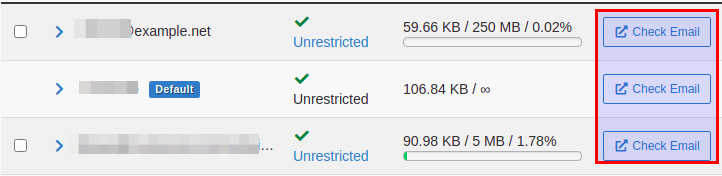
- Find the address you want to access and click Check Email on the right side of that row.
cPanel opens webmail in a new browser tab, pre-authenticated to that specific email account. This is particularly convenient when managing multiple email addresses under a single cPanel account.
How to Log into Webmail from the InMotion AMP Dashboard
InMotion customers can reach webmail directly from the AMP Dashboard without opening cPanel at all.
- Log into your AMP account at secure.inmotionhosting.com.
- On the main Dashboard screen, locate the Email icon.
- Click it to open cPanel’s Email Accounts interface.
- From there, click Check Email next to the address you want to access.
This path is useful if you primarily manage your account through AMP and want to skip an extra login step.
Why Are You Not Being Prompted for a Username and Password?
If you visit example.com/webmail and are not shown a login form, your browser may have cached a redirect, or a local network firewall is blocking port 2095.
Try these steps in order:
- Navigate to
webmail.example.cominstead (uses port 80). - Clear your browser cache and try again.
- If you are on a corporate or institutional network, check with your network administrator about port 2095 and 2096 restrictions.
How Do You Reset a Forgotten Webmail Password?
Webmail does not have its own password reset flow. The password is managed entirely within cPanel.
- Log into cPanel.
- Go to Email and then Email Accounts.
- Click Manage next to the relevant email address.
- Scroll to the Password section, enter a new password, and save.
Once updated in cPanel, use the new password at your webmail login URL.
What Email Features Are Available After You Log In?
Roundcube, the cPanel webmail client, includes:
- Inbox management: reply, forward, compose, and organize messages into folders
- Contacts: create and manage an address book
- Filters: set up server-side rules to sort or auto-delete incoming mail
- Identities: configure display name and reply-to address settings
- Spam folder access: review messages flagged by SpamAssassin
For more advanced email management within cPanel itself, see the related guides below.
What’s Next?
In addition to webmail, a few other email features can be used on our servers. You may be interested in learning more about:
- How to Create an Email Account in cPanel
- How to Set Up Email Forwarding in cPanel
- How to Configure SpamAssassin
- How to Set Up an Email Auto-Responder
- How to Change an Email Account Password in cPanel
- How to Modify Your MX Records
Need help with your email setup? InMotion Hosting’s 24/7 support team is available by chat or phone.