
In this article:
A WordPress plugin that restricts visitors to an “under construction” or login page can be helpful depending on the type of website. However, that plugin likely isn’t security-focused. And it serves no purpose until you need that maintenance page. That’s not the case with the WP Cerber Security plugin.
Instead, WP Cerber Security includes this restrictive feature within a list of many others. Therefore, you have a plugin that accomplishes more than one goal.
Furthermore, WP Cerber fights brute force attacks during maintenance time by using your white IP access list and other methods to restrict who can register, login, or access the login page.
Below we’ll cover how to restrict WordPress access to authorized users.
Edit WP Cerber Global Settings
- Log into WordPress.
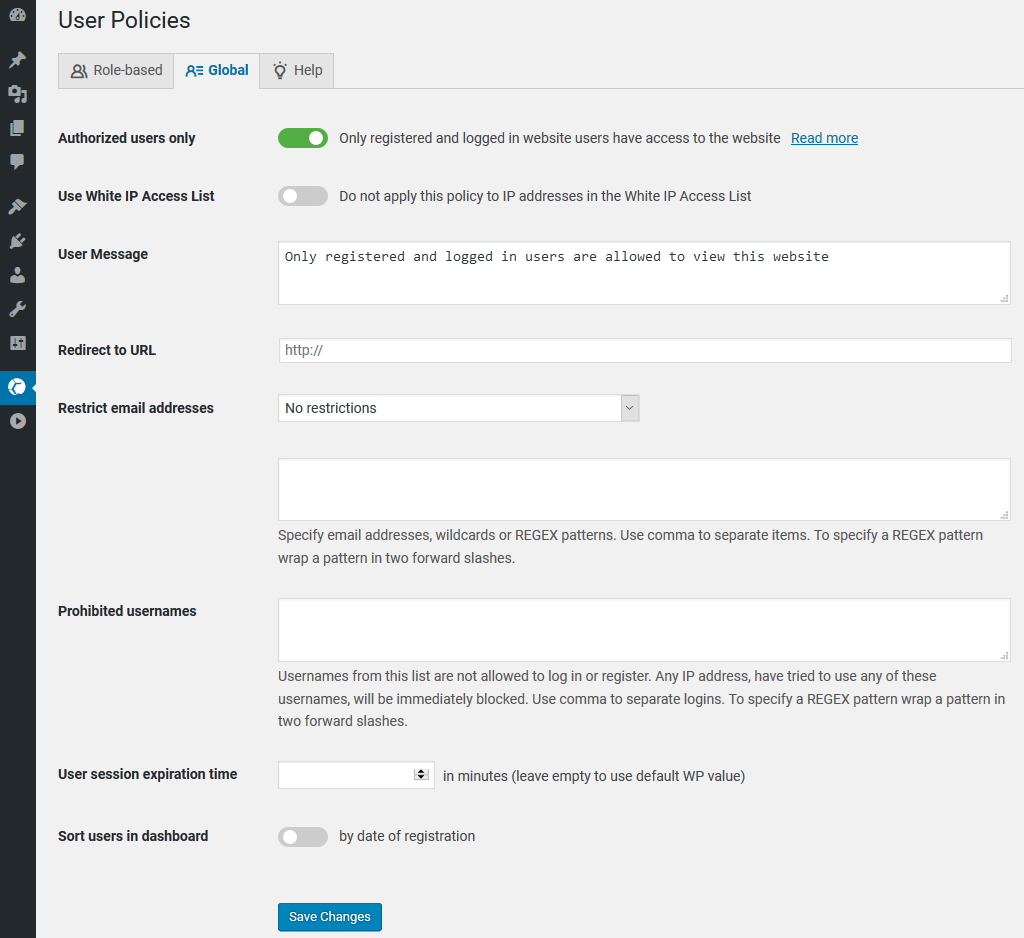
- Hover over WP Cerber on the left and click User Policies.
- Click the Global tab.
- Toggle Authorized users only to show green. The remaining options are optional but improve your security and users’ experience.
- (Optional) Toggle Use White IP Access List to allow all visitors access from whitelisted IPs.
- Edit the User Message which shows above the login section.
- (Optional) Fill in Redirect to URL for all URL requests except the login page – wp-admin. Popular examples include a maintenance, registration, or custom login page.
- (Optional) Restrict email addresses to explicitly “deny all” or “permit only” a specified list of users in the text box below. Use this if you only want same domain accounts registered to the website as brute force protection.
- Add Prohibited usernames for brute force protection against malicious activity – e.g. “admin”, “administrator”, “root”, and your name.
- User session expiration time determines how long an user can stay logged in at once.
- Sort users in the [WP Cerber] dashboard by date/time of website registration.
- Click Save Changes.
Ask about our Nginx-powered WordPress Hosting for faster performance to match your enhanced website security.