Deprecated: strpos(): Passing null to parameter #1 ($haystack) of type string is deprecated in /var/www/webdev/support/public/wp-content/plugins/post-and-page-builder/vendor/boldgrid/library/src/Util/Load.php on line 176

Deprecated: version_compare(): Passing null to parameter #2 ($version2) of type string is deprecated in /var/www/webdev/support/public/wp-content/plugins/post-and-page-builder/vendor/boldgrid/library/src/Util/Load.php on line 183

Notice: Function _load_textdomain_just_in_time was called incorrectly. Translation loading for the simple-lightbox domain was triggered too early. This is usually an indicator for some code in the plugin or theme running too early. Translations should be loaded at the init action or later. Please see Debugging in WordPress for more information. (This message was added in version 6.7.0.) in /var/www/webdev/support/public/wp-includes/functions.php on line 6170

Deprecated: Use of "parent" in callables is deprecated in /var/www/webdev/support/public/wp-content/plugins/simple-lightbox/includes/class.options.php on line 501

Deprecated: Use of "parent" in callables is deprecated in /var/www/webdev/support/public/wp-content/plugins/simple-lightbox/includes/class.options.php on line 501

Deprecated: Use of "parent" in callables is deprecated in /var/www/webdev/support/public/wp-content/plugins/simple-lightbox/includes/class.options.php on line 501

Deprecated: Use of "parent" in callables is deprecated in /var/www/webdev/support/public/wp-content/plugins/simple-lightbox/includes/class.options.php on line 501

Deprecated: Use of "parent" in callables is deprecated in /var/www/webdev/support/public/wp-content/plugins/simple-lightbox/includes/class.options.php on line 501

Deprecated: Use of "parent" in callables is deprecated in /var/www/webdev/support/public/wp-content/plugins/simple-lightbox/includes/class.options.php on line 501

Deprecated: Use of "parent" in callables is deprecated in /var/www/webdev/support/public/wp-content/plugins/simple-lightbox/includes/class.options.php on line 501

Deprecated: Use of "parent" in callables is deprecated in /var/www/webdev/support/public/wp-content/plugins/simple-lightbox/includes/class.options.php on line 501

Deprecated: Use of "parent" in callables is deprecated in /var/www/webdev/support/public/wp-content/plugins/simple-lightbox/includes/class.options.php on line 501

Deprecated: Use of "parent" in callables is deprecated in /var/www/webdev/support/public/wp-content/plugins/simple-lightbox/includes/class.options.php on line 501

Deprecated: Use of "parent" in callables is deprecated in /var/www/webdev/support/public/wp-content/plugins/simple-lightbox/includes/class.options.php on line 501

Deprecated: Use of "parent" in callables is deprecated in /var/www/webdev/support/public/wp-content/plugins/simple-lightbox/includes/class.options.php on line 501

Deprecated: Use of "parent" in callables is deprecated in /var/www/webdev/support/public/wp-content/plugins/simple-lightbox/includes/class.options.php on line 501

Deprecated: Use of "parent" in callables is deprecated in /var/www/webdev/support/public/wp-content/plugins/simple-lightbox/includes/class.options.php on line 501

Deprecated: Use of "parent" in callables is deprecated in /var/www/webdev/support/public/wp-content/plugins/simple-lightbox/includes/class.options.php on line 501

Deprecated: Use of "parent" in callables is deprecated in /var/www/webdev/support/public/wp-content/plugins/simple-lightbox/includes/class.options.php on line 501

Deprecated: Use of "parent" in callables is deprecated in /var/www/webdev/support/public/wp-content/plugins/simple-lightbox/includes/class.options.php on line 501

Deprecated: Use of "parent" in callables is deprecated in /var/www/webdev/support/public/wp-content/plugins/simple-lightbox/includes/class.options.php on line 501

Deprecated: Use of "parent" in callables is deprecated in /var/www/webdev/support/public/wp-content/plugins/simple-lightbox/includes/class.options.php on line 501

Deprecated: Use of "parent" in callables is deprecated in /var/www/webdev/support/public/wp-content/plugins/simple-lightbox/includes/class.options.php on line 501

Deprecated: Use of "parent" in callables is deprecated in /var/www/webdev/support/public/wp-content/plugins/simple-lightbox/includes/class.options.php on line 501

Deprecated: Use of "parent" in callables is deprecated in /var/www/webdev/support/public/wp-content/plugins/simple-lightbox/includes/class.options.php on line 501

Deprecated: Use of "parent" in callables is deprecated in /var/www/webdev/support/public/wp-content/plugins/simple-lightbox/includes/class.options.php on line 501

Deprecated: Use of "parent" in callables is deprecated in /var/www/webdev/support/public/wp-content/plugins/simple-lightbox/includes/class.options.php on line 501

Deprecated: Use of "parent" in callables is deprecated in /var/www/webdev/support/public/wp-content/plugins/simple-lightbox/includes/class.options.php on line 501

Deprecated: Use of "parent" in callables is deprecated in /var/www/webdev/support/public/wp-content/plugins/simple-lightbox/includes/class.options.php on line 501

Deprecated: Use of "parent" in callables is deprecated in /var/www/webdev/support/public/wp-content/plugins/simple-lightbox/includes/class.options.php on line 501

Deprecated: Hook tag_rewrite_rules is deprecated since version 3.1.0! Use post_tag_rewrite_rules instead. in /var/www/webdev/support/public/wp-includes/functions.php on line 6170

Warning: Cannot modify header information - headers already sent by (output started at /var/www/webdev/support/public/wp-content/plugins/post-and-page-builder/vendor/boldgrid/library/src/Util/Load.php:176) in /var/www/webdev/support/public/wp-content/plugins/vigia/includes/class-markdown-endpoints.php on line 2261
Adding an A Record | InMotion Hosting

Adding an A Record

Understanding the use and addition of an A record requires a brief explanation of DNS. DNS stands for Domain Name System. It converts human-readable domain names like example.com into IP addresses like 86.75.30.9 which computers can then read. DNS zone files reside on your server and tie domain names with IP addresses.

Most users do not need to modify their DNS settings. The most common reason for DNS changes are to route a certain part of your domain name to a third party (not our servers).

Using the Zone Editor in cPanel

cPanel provides the ability to maintain your DNS records via the Zone Editor. The following instructions provide the steps to create an A record.

  1. Log into your cPanel. Be sure to log in with the cPanel user that owns the domain you are creating an A record for.
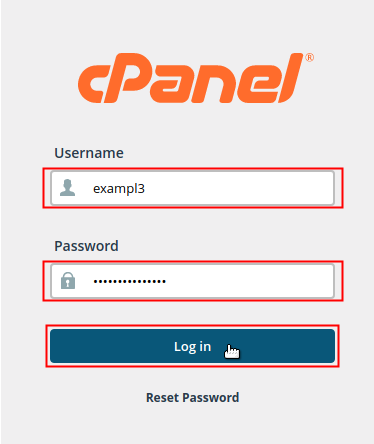
    Type username and password then click Log in to log into cPanel

  2. Locate the Domains section of cPanel and click on the Zone Editor icon.

    Click Zone Editor icon from domains section

  3. Find your domain in the list under the Domain heading. Under the Actions heading, click on the +A Record link that corresponds with the domain you want to add the A record for.
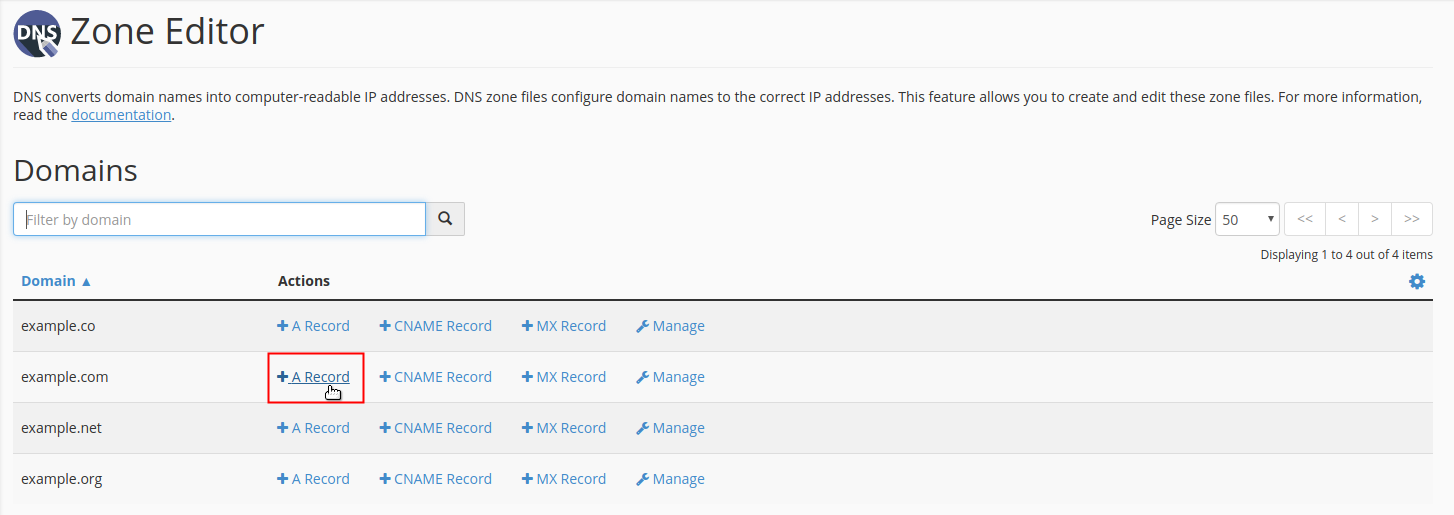
    Click +A Record next to domain

  4. A pop-up dialog box will display for you to fill in the data fields for your A Record. Type the Name and Address of your A record into the fields accordingly.
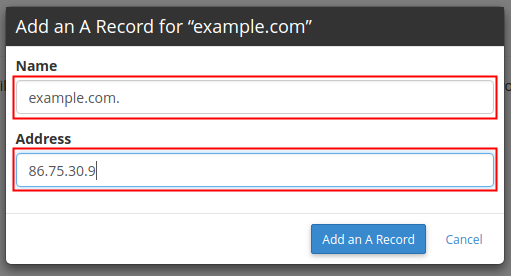
    Fill in data fields for Name and Address

    NOTE: You may refer to the descriptions in the table below to determine what information you will enter for your A record. However, the values indicated are simply provided as sample data and should not be used as the actual values in your record.
    A Record
    FieldDescriptionValue
    NameEnter the domain name that you are creating the A record for followed by a period.example.com.
    AddressEnter the IP address that you are pointing the A record to.86.75.30.9
  5. Click the Add an A Record button to save your changes.

    Click Add an A Record to save changes

Using the DNS Editor in WHM

VPS and Dedicated plans include a feature in WHM for editing DNS Zones for all cPanel accounts on the server. This editor provides greater control over DNS records than the Zone Editor in cPanel.

Summarize and Research with AI
Share on Social Media
IC
InMotion Hosting Contributor Content Writer

InMotion Hosting contributors are highly knowledgeable individuals who create relevant content on new trends and troubleshooting techniques to help you achieve your online goals!

More Articles by InMotion Hosting

Deprecated: trim(): Passing null to parameter #1 ($string) of type string is deprecated in /var/www/webdev/support/public/wp-content/plugins/simple-lightbox/includes/class.utilities.php on line 545