How to add a new model
- Create the models folder
If you haven’t already, you will need to create the models folder. This is where our model files will go. In our testing, we created:
/components/com_helloworld/models - Create <view>.php within models folder
Each component view can have a corresponding model. In this tutorial we are creating a model for our helloworld view, so we will be creating
/components/com_helloworld/models/helloworld.php
In this file, place the following code:
<?php // No direct access to this file defined('_JEXEC') or die('Restricted access'); // import Joomla modelitem library jimport('joomla.application.component.modelitem'); /** * HelloWorld Model */ class HelloWorldModelHelloWorld extends JModelItem { /** * @var string msg */ protected $msg; /** * Get the message * @return string The message to be displayed to the user */ public function getMsg() { if (!isset($this->msg)) { $this->msg = 'This message has been brought to you by the hello world model getMsg function.'; } return $this->msg; } } - Update your view.html.php file to call the getMsg() function
In our components/com_helloworld/views/helloworld/view.html.php file,
we originally created the “Hello World” message via the following line:$this->msg = 'Hello World';We will replace this line of code with the following:
$this->msg = $this->get('Msg');The view.html.php file will now look like the following:
<?php // No direct access to this file defined('_JEXEC') or die('Restricted access'); // import Joomla view library jimport('joomla.application.component.view'); /** * HTML View class for the HelloWorld Component */ class HelloWorldViewHelloWorld extends JViewLegacy { // Overwriting JView display method function display($tpl = null) { // Assign data to the view $this->msg = $this->get('Msg'); // Display the view parent::display($tpl); } }
Our new model in action
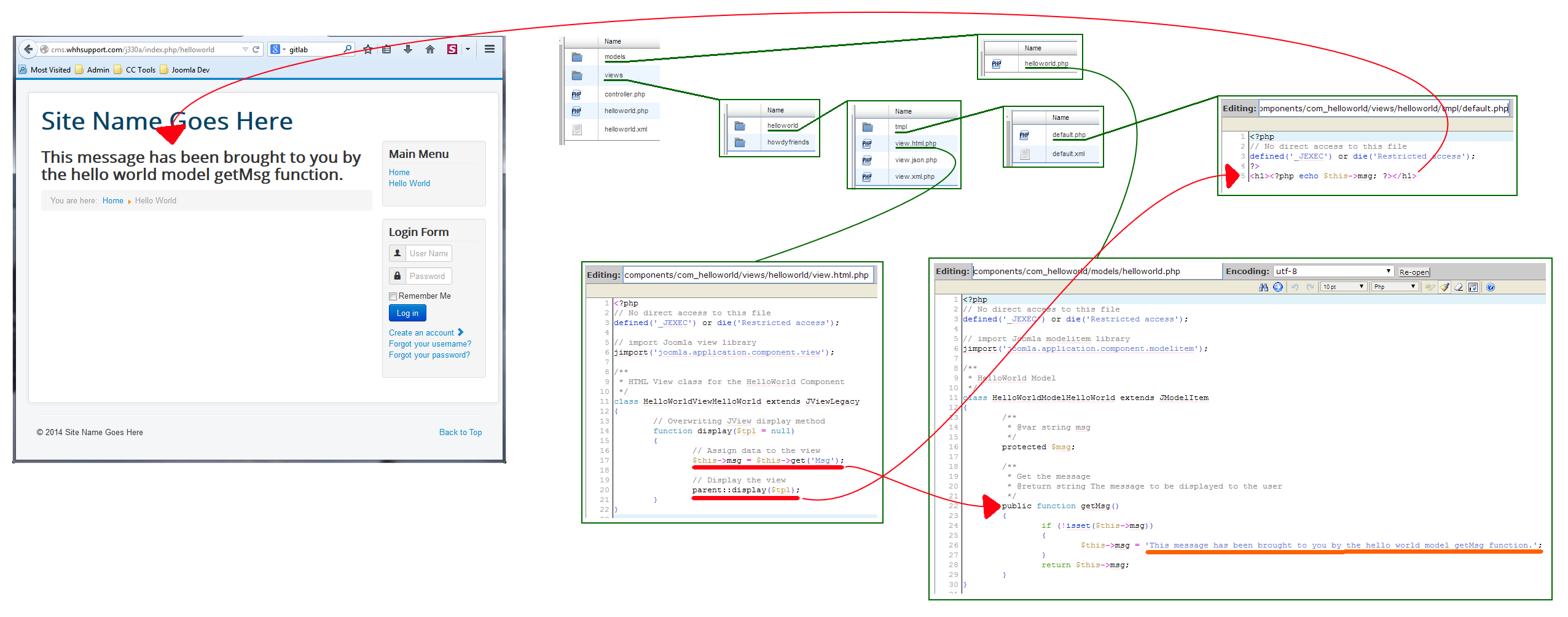
As you can see in the screenshot below, our new model comes into play when our view calls one of the model’s functions.
| View | When our view calls | $this->get(‘Msg‘); |
|---|---|---|
| Model | … the following fuction is run in our model: | getMsg() |